


API vs Event-Driven vs Orchestration: How to Choose the Right Integration Pattern in Azure
Section
Table of Contents
- Introduction: Integration Decisions Now Shape Cost, Speed, and Risk
- The Real Problem: Integration Complexity Comes From Poor Communication Design
- The Three Patterns in Azure: Where Each Works and Where Each Fails
- Decision Framework: How Leaders Should Choose the Right Pattern
- Conclusion: Build an Integration Model That Supports Change Without Adding Fragility
- FAQs (Frequently Asked Question)
Key Takeaways
- The blog explains how Azure integration architecture supports faster delivery, clearer ownership, better data visibility, and lower operational risk.
- It compares APIs, event-driven systems, and orchestration based on latency, coupling, failure handling, and business process needs.
- It shows where Azure API Management, Event Grid, Service Bus, Logic Apps, and Durable Functions fit in enterprise integration architecture.
- This blog also provides a practical decision model for choosing Azure integration patterns before complexity becomes expensive to correct.
Introduction: Integration Decisions Now Shape Cost, Speed, and Risk
Enterprise leaders usually do not experience integration failure as an architecture issue first. They see it through delayed product releases, brittle partner connections, duplicate data movement, unclear ownership, and higher incident response effort. This is why Azure integration architecture needs to begin with business outcomes—faster change cycles, lower operational risk, and clearer data visibility—supported by integration models that can support growth without adding avoidable complexity.
The choice between APIs, events, and orchestration is not a tooling preference. It defines how systems commit transactions, react to change, recover from failure, and expose data across business domains. In Azure, API Management can act as the gateway that proxies API requests, applies policies, verifies credentials, enforces rate limits, and emits telemetry for monitoring and troubleshooting. Event Grid provides a fully managed publish-subscribe model for event distribution over HTTP and MQTT, supporting event-driven serverless systems, application integration, and device data pipelines.
For CIOs, CTOs, IT Directors, Product Heads, and change leaders, the practical question is direct:
Which Azure integration patterns reduce dependency risk while keeping systems observable and adaptable?
A strong enterprise integration architecture does not force every interaction into one model. It separates real-time commitments, asynchronous reactions, and governed workflows so each business process has the right communication pattern.
The Real Problem: Integration Complexity Comes From Poor Communication Design
Integration failure often starts with a narrow design habit: every system conversation is treated like an API call. That works when the business process needs an immediate answer, such as checking inventory, validating payment, or confirming customer identity. It breaks when the same model is used for long-running fulfilment, downstream reporting, notifications, or partner data exchange. A strong Azure integration architecture starts by classifying the interaction before selecting a service.
Microsoft’s Azure Architecture Center notes that direct API calls may fit some application integration needs, while other systems need asynchronous communication through messaging or events, with workflow logic handled through orchestration. It also lists Azure API Management, Azure Logic Apps, Azure Service Bus, Azure Event Grid, Azure Functions, and Azure Data Factory as integration capabilities.
The issue is not API usage. The issue is using APIs as the default answer. Poor pattern selection creates predictable enterprise problems:
- Tight dependency chains: One unavailable service can delay a customer transaction, product flow, or operational task.
- Limited data visibility: Teams cannot easily trace what happened after a system publishes a change.
- Unclear ownership: No team knows whether the API provider, event producer, consumer, or workflow owner should fix a failure.
- Scaling pressure: Real-time calls increase load when asynchronous processing would have reduced contention.
- Risk during change: A small contract change can affect multiple dependent systems.
This is where synchronous vs asynchronous communication becomes a leadership concern, not only an engineering choice. Microsoft’s microservices guidance defines synchronous communication as a service calling another service through an exposed API while waiting for a response. Asynchronous message passing means a service sends a message without waiting, and one or more services process it separately.
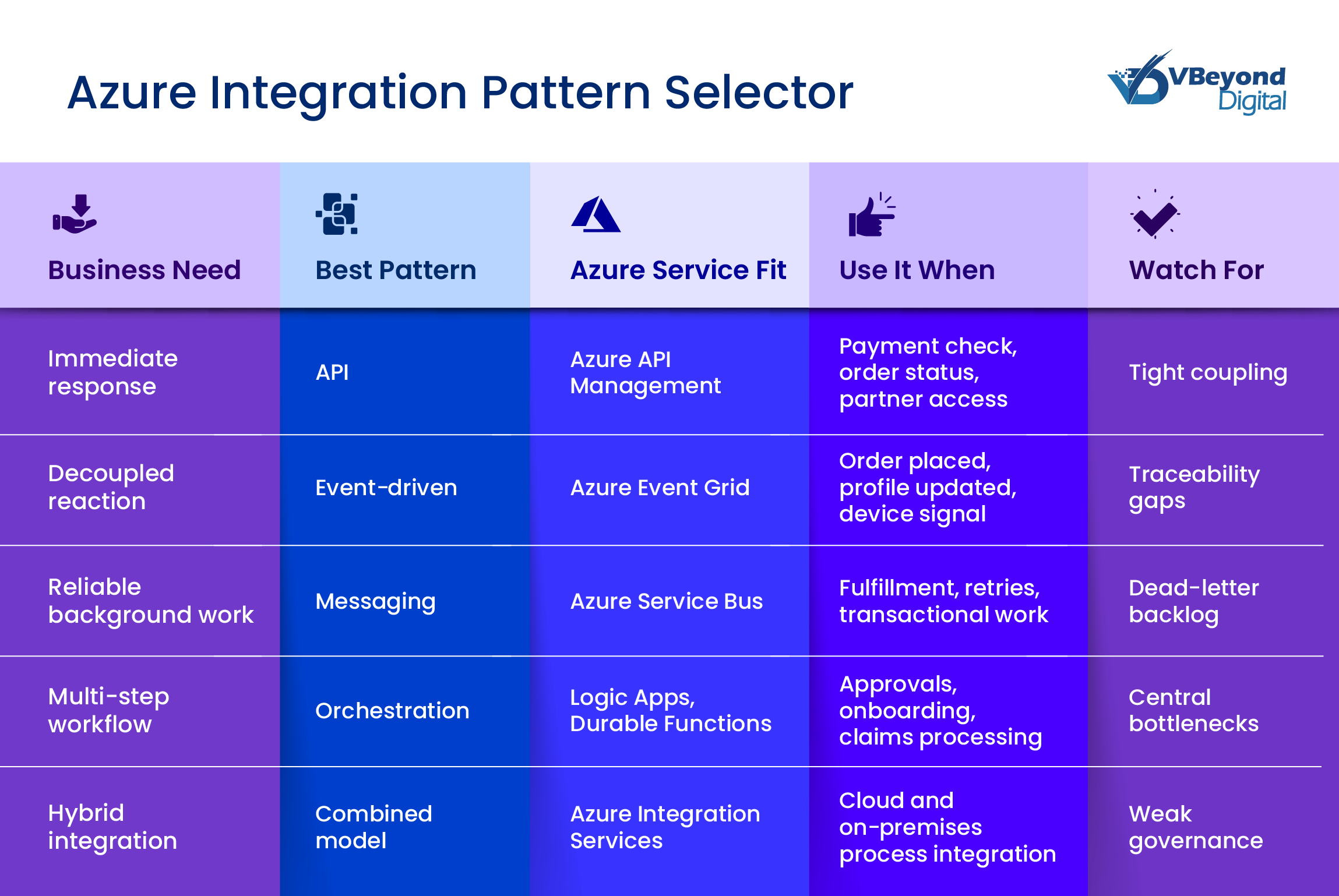
The Three Patterns in Azure: Where Each Works and Where Each Fails
A practical Azure integration architecture separates three interaction types: direct requests, asynchronous reactions, and controlled workflows. This distinction matters because each pattern changes cost, ownership, latency, recovery, and visibility.
APIs: Best for real-time commitments
APIs fit business moments where the caller needs a clear answer before work can continue. Examples include customer authentication, price checks, order confirmation, payment authorization, or partner portal requests. In these cases, synchronous communication is appropriate because the business process depends on an immediate response.
In Azure, API Management sits in front of APIs as a managed gateway. It can route API calls, apply policies, validate credentials, manage throttling, and support monitoring through gateway-level telemetry. Microsoft’s rate-limit policy, for example, can return a 429 response when a caller exceeds the configured request limit.
Use APIs when:
- The business interaction requires an immediate response.
- The provider and consumer can work against a stable contract.
- The organization needs central access control, rate limits, versioning, and API visibility.
The failure pattern is overuse. If every downstream step becomes a synchronous API call, one slow service can delay the full transaction. This is where enterprise API strategy must define which calls are true business commitments and which should move into asynchronous processing.
Event-driven: Best for decoupled reactions
Event-Driven Architecture in Azure works when one system announces that something happened, and other systems can react independently. Examples include “order placed,” “invoice approved,” “customer profile changed,” or “shipment dispatched.” Event Grid is a fully managed publish-subscribe service that supports HTTP and MQTT, push and pull delivery, and CloudEvents 1.0 for interoperability across systems.
Use event-driven patterns when:
- Multiple systems need the same business signal.
- The producer should not wait for consumers.
- Workloads are bursty, distributed, or tied to IoT, data movement, or notification use cases.
The risk is loss of operational control. Without event schemas, correlation IDs, retry rules, and ownership boundaries, teams may struggle to trace failures. This is the central trade-off in API vs Event-Driven Architecture: APIs give control at the point of request, while events give separation at the cost of added tracing discipline.
Orchestration: Best for governed multi-step outcomes
Orchestration fits processes that need state, sequence, approval, or compensation. Examples include claims processing, onboarding, returns, loan approvals, and exception handling. Azure Logic Apps supports workflow control through conditions, loops, scopes, scheduling, and connectors. Durable Functions supports stateful workflows in serverless code, with the runtime managing state, checkpoints, retries, and recovery for long-running work.
Use orchestration when:
- A process spans systems, teams, or time.
- The business needs process history and exception handling.
- Recovery requires retry, compensation, or human review.
The failure pattern is central dependency. Too much Azure API orchestration can slow change if every service must wait for one workflow owner. The right Azure integration patterns use APIs for commitments, events for reactions, and orchestration for managed outcomes within a broader Enterprise integration architecture.
Decision Framework: How Leaders Should Choose the Right Pattern
The most effective Azure integration architecture starts with the nature of the business interaction. Before selecting a service, leaders should ask whether the system needs an immediate answer, a reliable background process, a broadcast event, or a controlled workflow. This prevents teams from forcing every interaction into APIs, or replacing clear contracts with loosely governed events.
A practical decision model should account for five factors:
- Latency: Does the business process need a response in real time?
- Coupling: Can the producer and consumer change independently?
- Failure handling: Should the system retry, hold, inspect, or compensate for failed work?
- Ownership: Which team owns the contract, message, workflow, and operating model?
- Visibility: Can teams trace the transaction across APIs, events, queues, and workflows?
For synchronous vs asynchronous communication, the rule is direct. Use APIs when the caller needs a confirmed response. Use messaging or events when work can happen after the original transaction.
Design Integration With Less Risk
Conclusion: Build an Integration Model That Supports Change Without Adding Fragility
The strongest Azure integration architecture is not API-led, event-led, or orchestration-led. It is decision-led. Each business interaction should be mapped to the pattern that fits its latency, ownership, recovery, and visibility requirements. That is how technology leaders reduce rework, contain operational risk, and give teams a clearer path from strategy to build.
VBeyond Digital helps leaders convert these choices into measurable outcomes: lower failure impact, faster delivery, clearer data movement, and an enterprise integration architecture that can scale without avoidable complexity.
From strategy to build, we help tech leaders move faster with less risk by defining the right Azure integration patterns for each business process.
FAQs (Frequently Asked Question)
Azure integration architecture is the design model for connecting applications, data, systems, and processes across cloud and on-premises environments using services such as API Management, Logic Apps, Service Bus, and Event Grid. Microsoft groups these under Azure Integration Services.
APIs should be used when a system needs an immediate request-response interaction, such as payment validation, customer lookup, order status, or partner access. Azure API Management can apply policies for authentication, rate limiting, caching, and request or response handling.
Event-Driven Architecture in Azure uses events to notify other systems that something happened. Azure Event Grid is a managed publish-subscribe service that supports HTTP, MQTT, push delivery, pull delivery, and CloudEvents 1.0 for event distribution.
Orchestration coordinates multi-step workflows across systems. Azure Durable Functions supports stateful serverless workflows through orchestrator, activity, and entity functions, while the runtime manages state, checkpoints, retries, and recovery for long-running processes.
API-driven architecture uses synchronous request-response calls where the caller waits for an answer. Event-driven architecture uses asynchronous messages or events where producers publish changes and consumers react independently. APIs suit direct commitments. Events suit decoupled reactions.
They become complex when teams choose patterns without defining latency needs, ownership, failure handling, contracts, and observability. Overused APIs create tight coupling. Poorly governed events reduce traceability. Overused orchestration creates central dependency. A clear enterprise API strategy reduces these risks.
