


Loading...
Section
Key Takeaways
- The blog explains why Power BI inconsistent metrics usually come from semantic drift inside the Power BI semantic layer, not source-system errors.
- It shows how Microsoft Fabric architecture, especially multiple semantic models and Direct Lake fallback behavior, can widen reporting inconsistency.
- It identifies where Power BI KPI mismatch appears first: finance, sales, and executive reporting built on duplicated or modified semantic logic.
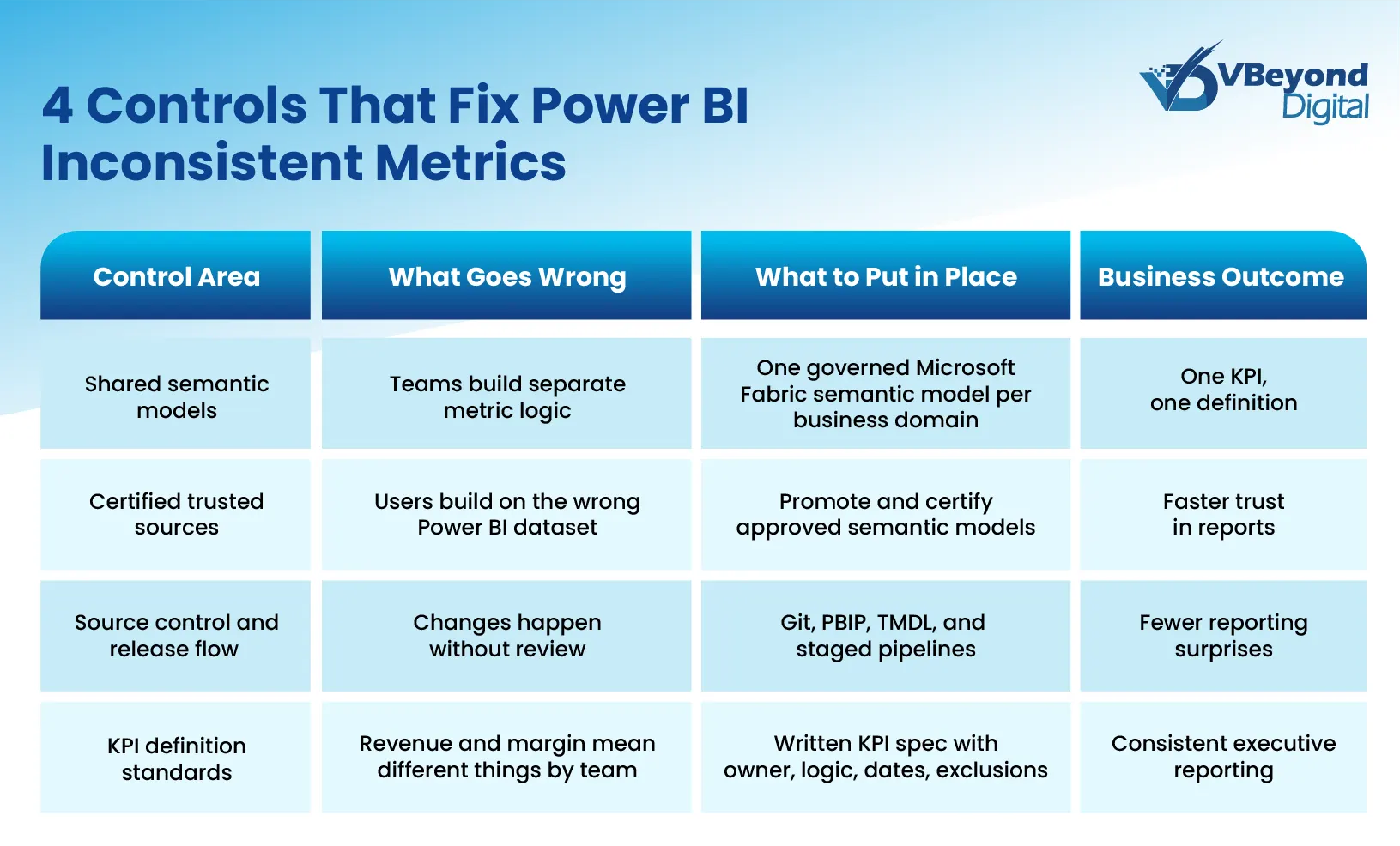
- It outlines fixes: shared certified models, strong Microsoft Fabric governance, source control, and KPI standards for consistent Power BI reporting.
Introduction
The problem usually surfaces in the worst possible place: a board meeting. Finance presents quarterly revenue from one Power BI report; Sales presents revenue for the same period from another, and both numbers come from the same Microsoft Fabric environment. At that point, the issue is no longer just reporting friction. It becomes a credibility problem for the entire data program. That matters because data trust remains weak across many organizations.
In many cases, this is not a source data failure. It is a semantic modeling failure. Microsoft defines a Microsoft Fabric semantic model as the logical description of an analytical domain, including metrics, business-friendly terminology, and representation for deeper analysis. When those definitions drift across a Power BI semantic model, a copied Power BI dataset, or a report-specific calculation, Power BI reports showing different numbers become a structural issue inside the Power BI semantic layer.
This blog is written for CIOs, CTOs, IT Directors, Product Heads, and data platform owners who need reporting trust, not just more dashboards. It examines what causes semantic drift inside Microsoft Fabric architecture, where Power BI KPI mismatch shows up in practice, and which Power BI data modeling best practices and governance decisions bring consistency back to Power BI reporting.
What Is Semantic Model Drift and Why It Happens
Semantic model drift is the condition where the same business metric is calculated differently across two or more semantic models, reports, or teams. In a Microsoft Fabric semantic model, the semantic layer is where metrics, business terms, relationships, and analytical structure are defined. Microsoft describes the semantic model as the logical description of an analytical domain, typically organized as facts and dimensions for filtering, slicing, and calculation. That means a Power BI semantic model is not just a technical wrapper around source data. It is the place where business meaning is created. When two models define revenue, margin, or pipeline differently, Power BI reporting starts to show different answers even when the underlying tables come from the same source systems. This is the core pattern behind Power BI inconsistent metrics and many cases of Power BI reports showing different numbers.
Drift usually begins with a practical shortcut. One team builds a strong Power BI dataset for finance reporting. Another team copies that model, changes a DAX measure, adds a filter, or switches the active date logic for a sales use case. A third team creates a report file that becomes its own semantic model after publishing, instead of staying as a thin report connected to the shared source. Over time, each copy moves in a different direction. Microsoft’s managed self-service BI guidance states that the goal is to minimize the number of semantic models and avoid the opposite extreme, where a new semantic model is created for every report. Microsoft also notes that shared semantic models are meant to support many reports, with any model change affecting all connected reports.
This is why semantic drift is structural, not accidental. It grows from a lack of shared ownership inside the Power BI semantic layer. Relationship design is one source of divergence. Microsoft’s modeling guidance states that only one active filter propagation path can exist between two model tables, and inactive paths only apply when a DAX calculation activates them. In practice, that means two Power BI semantic models can point to the same data and still return different results because one model uses a different active relationship, different filter direction, or a different table grain. Many Power BI modeling mistakes are subtle enough to go unnoticed by report consumers, but their impact appears immediately in KPI totals.
How Microsoft Fabric's Architecture Compounds the Problem
Microsoft Fabric architecture gives data teams more speed, scale, and modeling flexibility. That is valuable, but it also raises the chance of Power BI inconsistent metrics when governance is weak. In Fabric, the Microsoft Fabric semantic model is an independent analytical asset, not just a report byproduct. Teams can build multiple semantic models over the same lakehouse, warehouse, or existing Power BI dataset, and those models can use different storage modes, relationships, and calculation logic. Once that happens, the Power BI semantic layer can drift faster than many teams expect, especially when different business units publish their own versions of core KPIs. Microsoft’s managed self-service guidance is explicit on this point: organizations should keep the number of semantic models low and push report authors toward shared models rather than a new model for every report.
Three parts of Microsoft Fabric architecture make this more likely.
- Direct Lake can mask material differences in query behavior.
Direct Lake on SQL endpoints reads Delta tables from OneLake for fast reporting, but Microsoft states that it can fall back to DirectQuery when a view is used, when SQL granular access is enabled, or when a Direct Lake guardrail is hit. Microsoft also notes that, in this mode, refresh can succeed with a warning and queries still return results, but performance is slower. That matters for Power BI reporting because the report still works, while the model may now behave differently from what the author expects. By contrast, Direct Lake on OneLake does not work the same way. When it exceeds guardrails, the model can become unavailable rather than falling back in the same manner. This difference inside the Power BI semantic model can create confusion around freshness, query timing, and troubleshooting.
- Decoupled semantic models create more room for divergence.
Back in 2025, Microsoft default semantic models stopped being created automatically, and existing default semantic models were disconnected from their parent Fabric items and became independent semantic models. That gives teams more control, but it also means two semantic models that appear related may no longer have a built-in governance relationship. In practice, one team may change a Power BI dataset, while another continues reporting from an older independent copy. That is a direct path to Power BI reports showing different numbers.
- Mixed storage modes and self-service creation raise model sprawl.
Microsoft documents that Power BI semantic models can combine Import, DirectQuery, and Direct Lake tables in composite semantic models. It also states that self-service users often rely on their own judgment, which produces technical debt and inconsistencies. This is where many Power BI modeling mistakes start. A team connects to an existing shared model, adds local tables, changes a measure, and publishes a new semantic model for one report. Another team does the same for another use case. The result is not one governed Power BI semantic layer, but several similar models with slightly different logic. Over time, that is how a Power BI KPI mismatch becomes routine rather than exceptional.
Where Semantic Drift Breaks Reporting in Practice
The business impact of semantic drift is rarely abstract. It shows up in operating reviews, board packs, forecast calls, and monthly business reviews where leaders expect one answer and receive several. A Microsoft Fabric semantic model can hold metrics, relationships, and business-friendly terminology, so any inconsistency inside the Power BI semantic layer can surface as a reporting conflict even when the source systems are stable. That is why Power BI inconsistent metrics usually become visible first in decision meetings, not in data engineering logs.
Here is where the failure pattern appears most often:
- Finance and Sales report the same business outcome through different semantic logic.
Finance often needs a controlled view tied to accounting rules, while Sales often needs a view tied to pipeline movement, bookings, or close dates. The problem is not that both views exist. The problem starts when both are labeled with the same business term inside Power BI reporting. Microsoft’s guidance on shared semantic models notes that any changes to a shared semantic model affect all reports connected to it, while other teams can also create specialized models when the central model does not meet their needs. Without clear naming, ownership, and metric boundaries, that split quickly turns into Power BI reports showing different numbers for what leaders assume is one KPI.
- Metric definition inconsistency spreads through copied or extended models.
A thin report connected by live connection does not create a local model, which is exactly why it is valuable for controlled reuse. But Microsoft also documents that report creators can extend existing semantic models with local data and calculations through composite modeling. This flexibility is useful, yet it is also one of the main routes to Power BI KPI mismatch. One team adds a local measure for margin. Another changes filter logic for pipeline. A third introduces a different date relationship. The report names stay familiar, but the Power BI semantic model logic no longer matches across teams.
- Relationship design creates silent differences in totals.
Microsoft’s modeling guidance recommends star schema design and explains that relationships propagate filters from dimensions to facts. It also notes that inactive relationships only apply when explicitly activated in DAX. This is one of the most common sources of Power BI modeling mistakes. Two Power BI datasets can point to the same data and still return different totals if one model filters by invoice date and another filters by order date, or if one model uses a different cross-filter pattern. To the business, it looks like the data changed. In reality, the Power BI semantic layer changed.
- Versioning gaps break reports after production changes.
Microsoft states that renaming or deleting a column or measure can break existing visualizations. It also documents that if items are not paired in deployment pipelines, a clean deploy creates a duplicate copy instead of overwriting the target item. That is a serious Microsoft Fabric governance issue. A team may think it updated the production Power BI dataset, while downstream reports remain attached to an older item or a copied semantic model. The result is not just broken visuals. It is fragmented reporting logic and rising doubt in every executive review that follows.
Fix Semantic Drift Before Scale
Conclusion
When a KPI shows different values across dashboards, the first question should not be whether the source data is broken. It should be whether the Microsoft Fabric semantic model and the wider Power BI semantic layer define that KPI the same way across reports. Microsoft’s own documentation makes the reason clear: semantic models hold metrics, business terminology, and analytical structure, so any inconsistency there will surface directly in Power BI reporting.
The answer is structural. Strong Power BI data modeling best practices, clear ownership of each Power BI semantic model, trusted endorsed content, disciplined release control, and written KPI definitions reduce Power BI inconsistent metrics at the root. As Microsoft Fabric architecture adds more AI-driven experiences, including Fabric IQ and data agents that work against shared semantics, the cost of weak definitions rises well beyond dashboard accuracy.
FAQs (Frequently Asked Question)
Because the metric may be defined differently across semantic models, datasets, relationships, filters, or storage modes. The source data can be identical while the Power BI semantic model logic is not.
Semantic model drift is when metric definitions, business logic, or relationships change inconsistently across reports or semantic models, causing the same KPI to return different values.
Use shared semantic models, certify trusted content, keep metric logic under source control, and document KPI definitions, ownership, and change rules in one governed semantic layer.
Fabric adds flexibility through independent semantic models, mixed storage modes, and Direct Lake behavior. Without governance, that flexibility can increase model sprawl and inconsistent reporting logic.
Standardize KPIs in one governed semantic model per business domain, certify approved models, and maintain written KPI definitions for calculation rules, owners, and date logic.

