


Loading...
Section
Table of Contents
Key Takeaways
- Enterprise automation fails when workflows depend on human accounts, shared credentials, weak ownership, and fragmented access models.
- Enterprise Automation Identity Architecture separates machine execution from human access through Azure Workload Identities and non-human identity management.
- The blog explains managed identities Azure, Service Principal Power Automate, Azure Key Vault secret management, and Power Platform governance.
- VBeyond Digital helps enterprises reduce Power Automate security risks and build a stronger enterprise automation strategy.
Introduction
Enterprise automation is now a core operating model for modern organizations. CIOs, CTOs, IT Directors, Product Heads, and Transformation Leaders are scaling workflows across Azure, Power Platform, Microsoft 365, APIs, data platforms, and third-party systems. Yet many automation programs become less reliable as they grow. The issue is rarely the automation tool itself. The deeper issue is Enterprise Automation Identity Architecture: how identities, credentials, permissions, ownership, and runtime access are designed for machine-scale operation.
When automations run under employee accounts, shared credentials, or poorly governed service accounts, the business inherits hidden points of failure. A password reset can stop a workflow. A role change can remove access. A license change can break a flow. A departed employee can leave behind orphaned automation. MFA and Conditional Access can protect the enterprise while also exposing fragile automation design.
This is why Azure Workload Identities, managed identities Azure, Service Principal Power Automate, Azure Key Vault secret management, and strong Power Platform governance must be part of the enterprise automation strategy from the start.
Microsoft’s 2025 guidance is explicit: user identities are not recommended for automation, and organizations should migrate those patterns to workload identities. Microsoft also confirms that managed identities and service principals are not impacted by Azure mandatory MFA enforcement, while user identities used for scripts or automated tasks must satisfy MFA requirements once enforcement applies.
The urgency is not only operational. Microsoft’s 2025 Digital Defense Report states that identity-based attacks rose by 32% in the first half of 2025, showing that identity has become both a reliability dependency and a security control point.
A resilient Enterprise Automation Identity Architecture gives leaders a better path: automation that is reliable, auditable, scalable, and governed even when people leave, credentials rotate, policies change, or compliance reviews begin. This blog follows the approved structure from the outline and builds on its problem-solution framing.
How Identity Architecture Becomes the Hidden Variable in Automation Failure
Automation breaks at scale when identity design is treated as an implementation detail. A durable Enterprise Automation Identity Architecture must separate human access from machine execution, define ownership, and align runtime permissions with business risk.
- Human identities running machine workloads
Power Automate flows built under developer or manager accounts depend on that person’s password, MFA status, license, role, and employment state. Microsoft confirms that orphaned flows can fail when the owner leaves and the flow uses connections tied to that user account. This is one of the clearest Power Automate security risks because the workflow may look business-owned while still depending on a single employee identity.
- No non-human identity management model
Many enterprises still lack formal non-human identity management. Microsoft defines workload identities as applications, service principals, and managed identities. In practice, this means Azure Workload Identities, managed identities Azure, and Service Principal Power Automate should be treated as governed assets, not one-off technical accounts.
- Security policies applied to the wrong identity type
Microsoft’s 2025 MFA enforcement applies to user identities signing in through Azure CLI, Azure PowerShell, REST APIs, SDKs, and IaC tools for create, update, and delete actions. Microsoft recommends moving user-based service accounts to workload identities. This makes Azure managed identity vs service principal a strategic design decision, not a technical preference.
What Silent Failure Actually Costs
Credential failure rarely starts as a visible outage. It often appears as a missed trigger, a disabled flow, a broken connector, or data that stops moving between systems. Microsoft lists expired tokens, DLP blocks, password changes, Conditional Access mismatches, and disabled accounts as common causes of broken Power Platform connections.
This is where Enterprise Automation Identity Architecture becomes a business risk control, not only an IT design choice. Weak non-human identity management can create hidden failure points across approvals, finance workflows, customer onboarding, reporting, and regulated data movement.
Key risk areas include:
- Silent operational failure: Power Automate triggers can fail because of connection problems, expired authentication tokens, licensing problems, or misconfigured conditions.
- Credential exposure: GitGuardian reported 28.65 million new hardcoded secrets in public GitHub commits in 2025, up 34% year over year.
- Audit gaps: Personal account automation makes it harder to prove which process acted, which identity approved access, and who owns remediation.
- Breach cost: Data breach costs more than we think. IBM’s 2025 report puts the global average cost of a data breach at USD 4.4 million. .
What a Resilient Identity Architecture for Automation Looks Like
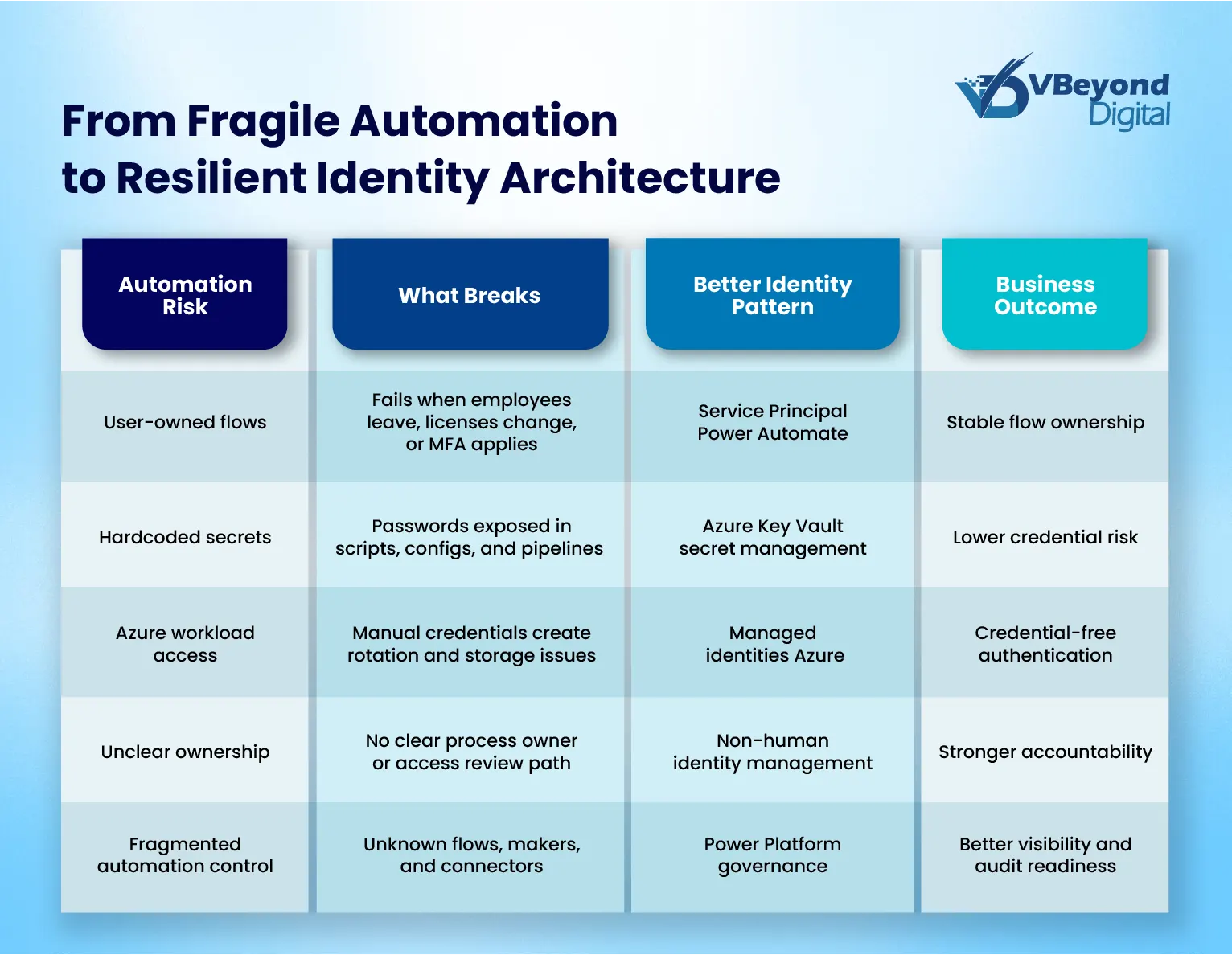
A resilient Enterprise Automation Identity Architecture starts with one rule: machine execution needs machine identity. Human accounts should approve, monitor, and govern automation, not act as the runtime identity.
Core design patterns include:
- Use managed identities Azure for Azure-native workloads.
Microsoft states that managed identities remove the need to manage credentials, and the credentials are not accessible to users. This fits Azure Automation, Functions, App Services, Logic Apps, and VMs that need Microsoft Entra authentication.
- Choose the right model in Azure managed identity vs service principal decisions.
Use system-assigned managed identities when identity lifecycle should match one Azure resource. Use user-assigned managed identities when multiple resources need the same governed identity.
- Use Service Principal Power Automate for critical flows.
Microsoft says service principal application users can own and run Power Automate flows, giving organizations more stability in administration.
- Centralize secrets through Azure Key Vault secret management.
Power Automate supports Azure Key Vault credentials for desktop flows and desktop flow connections, reducing stored credential exposure.
- Tie Power Platform governance to inventory.
Microsoft’s CoE Starter Kit inventory helps teams understand apps, flows, and makers, forming the control base for ownership and access review.
Build Resilient Automation Identity Now
Where Organizations Typically Get Stuck and What to Fix First
Most enterprises are not starting from a clean state. They already have years of flows, scripts, runbooks, Logic Apps, connectors, shared accounts, and user-based automations. The challenge is changing identity design without breaking business operations. This is where Enterprise Automation Identity Architecture needs a phased remediation model.
Start with inventory. Microsoft states that CoE Starter Kit inventory is central to understanding apps, flows, and makers, and to building the base for monitoring new Power Platform assets. This makes Power Platform governance the first control layer for identifying orphaned flows, unknown owners, and risky connections.
Prioritize fixes by business risk:
- Mission-critical approvals, finance workflows, and regulated data movement
- Flows owned by departed users or shared mailboxes
- Scripts using passwords, ROPC, or personal accounts
- Workloads with broad permissions and weak ownership
- Secrets stored outside Azure Key Vault secret management
Then migrate by identity type. Use Service Principal Power Automate for critical Power Platform flows. Move Azure-native workloads to managed identities of Azure. Use Azure Workload Identities where non-interactive authentication is required. Microsoft’s MFA Phase 2 began on October 1, 2025, for Azure CLI, Azure PowerShell, Azure mobile app, IaC tools, REST APIs, and SDKs for create, update, and delete actions; furthermore, Microsoft recommends moving user-based service accounts to workload identities.
Conclusion
Enterprise automation does not become reliable by adding more tools. It becomes reliable when identity, credential control, access ownership, and runtime governance are designed as one operating model. A mature Enterprise Automation Identity Architecture separates people from machine execution, reduces dependency on personal accounts, and gives leaders clearer control over automation risk.
The operating principle is simple:
- Use managed identities Azure for Azure-native workloads where possible.
- Use Service Principal Power Automate for critical Power Platform flows that should not depend on employee lifecycle events.
- Use Azure Key Vault secret management where secrets still exist.
- Treat Power Platform governance and non-human identity management as core parts of enterprise automation strategy.
Microsoft states that managed identities remove the need to manage credentials, while Power Automate supports service principal-owned flows for stability in administration.
VBeyond Digital helps technology leaders assess fragile automation ecosystems, redesign identity foundations, and move from reactive fixes to measurable outcomes. From strategy to build, we help teams create automation that scales with less risk.
FAQs (Frequently Asked Question)
Enterprise automation fails at scale when workflows depend on user accounts, shared credentials, unmanaged service accounts, or weak ownership. Password changes, MFA, employee exits, and license changes can break automations unless Enterprise Automation Identity Architecture is planned from the start.
Identity architecture defines how automations authenticate, receive permissions, store credentials, prove ownership, and pass audits. In enterprise automation, it includes Azure Workload Identities, non-human identity management, Power Platform governance, managed identities Azure, service principals, and Azure Key Vault secret management.
Managed identities Azure are Microsoft Entra identities assigned to Azure resources. Microsoft says they remove the need to manage credentials, and those credentials are not accessible to users. They help Azure services authenticate without hardcoded secrets.
Managed identities are tied to Azure resources and are best for Azure-native workloads. Service principals represent applications and can support broader app or cross-system access. Microsoft Power Automate also supports service principal-owned flows for flexibility and stability in administration.
MFA can break automation that signs in with user identities. Microsoft’s Azure MFA guidance says user identities used as service accounts for automation should move to workload identities. Managed identities and service principals are not affected by Azure mandatory MFA enforcement.

