
Loading...
Section
Table of Contents
- Introduction: AI risk shows up first in business outcomes
- Where AI degradation appears in day-to-day enterprise work
- Why enterprises miss degradation until decisions are affected
- A practical control model for detecting decline and triggering intervention
- Conclusion: What measurement and ownership look like at scale
- FAQs (Frequently Asked Question)
Key Takeaways
- This blog shows how to detect when Copilot outputs stop being reliable inside live workflows.
- It explains who should own AI output quality and decision impact across business systems.
- It defines what triggers intervention and what actions should follow.
- It outlines a practical control model using evaluation, monitoring, tracing, and ownership.
Introduction: AI risk shows up first in business outcomes
Enterprise AI risk rarely appears first as downtime. It appears as weaker decisions inside live workflows that still look active to the business. A sales team still receives recommendations. A service agent still gets a case summary. A manager still sees an AI-generated answer in reporting. Yet the real issue is that output quality can slip through poorer grounding, thinner context, stale source content, or inconsistent response behavior while the system remains available. That is the core challenge behind AI degradation n in production environments.
For CIOs, CTOs, and transformation leaders, the first signal is usually not model failure. It is declining decision reliability. Microsoft’s reporting stack is strong at surfacing readiness, adoption, impact, sentiment, and copilot usage. These signals do not confirm whether outputs still meet the required standard for decisions. At the same time, Microsoft states that Copilot outputs in Power BI can be inaccurate, low quality, and nondeterministic, which makes Enterprise AI governance and an AI assessment framework business-critical rather than optional.
In practice, degradation becomes visible when outputs require correction, conflict with trusted data, or fail to support a decision without additional validation. These are early warning signals, not edge cases.
Where AI degradation appears in day-to-day enterprise work
AI degradation usually appears inside active workflows, not as a visible outage. That is why AI model degradation is easy to miss during copilot implementation. The interface still responds. Users still get summaries, suggestions, and answers. But decision quality can start to weaken long before teams report a technical failure.
- Microsoft 365 Copilot and knowledge work: Microsoft states that Microsoft 365 Copilot grounds responses in organizational content and user context through Microsoft Graph. Microsoft Copilot Studio guidance also explains that grounded responses depend on trusted enterprise content. When prompt context is weak, source content is stale, or retrieval quality drops; the user may still receive a fast answer that feels complete but is less reliable for drafting, summarizing, or internal knowledge retrieval. This is one of the first places AI model drift and AI risk become visible in daily work.
- CRM and sales workflows: In Dynamics 365 Sales, Copilot answers and enrichment actions rely on CRM records, Dataverse data, and connected communications. Microsoft states that suggestion of quality depends on the quality, completeness, and currency of source data. That means stale records, missing fields, or conflicting updates can reduce recommendation quality even while the assistant keeps working normally.
- Service operations: Microsoft is explicit that content generated by Copilot in Customer Service is not intended for use without human review or supervision. It also notes that knowledge-based responses depend on high-quality and up-to-date knowledge articles for grounding. In practice, that means case summaries, reply drafts, and support guidance can become less dependable before leaders see a formal service issue.
- Reporting and analytics: Power BI and Microsoft Fabric both warn that Copilot can produce inaccurate or low-quality outputs, including incorrect answers to data questions, and that responses can be nondeterministic. This is where Copilot AI degradation directly affects business decisions, as inaccurate outputs can influence financial reporting, planning, and operational actions.
Strengthen AI Control Before Drift
Why enterprises miss degradation until decisions are affected
Most organizations do not miss AI degradation because the model fails loudly. They miss it because they have not defined what “good enough” means for each workflow. In practice, that means no agreed threshold for a usable sales recommendation, no standard for a safe service reply, and no rule for when an AI-generated summary is too weak for executive reporting. NIST’s AI RMF says roles and responsibilities for mapping, measuring, and managing AI risks should be documented and clear across the organization. Its Generative AI Profile goes further by calling for post-deployment monitoring plans, user-input capture, appeal and override paths, incident response, recovery, and change management. Without defined thresholds, teams cannot distinguish between acceptable variation and unacceptable output. This makes intervention reactive instead of controlled.
That gap becomes more serious during copilot implementation because many leadership views are built around activity, sentiment, and impact rather than workflow-level answer quality. Microsoft’s Copilot Dashboard focuses on readiness, adoption, impact, and sentiment. The Microsoft 365 Copilot usage report tracks active users and feature activity. Those are useful operating signals, but they do not answer whether a recommendation was grounded, complete, or safe enough for a customer interaction or management decision.
Why this becomes an operational failure instead of a model problem:
- No workflow thresholds: Without an AI assessment framework, teams cannot detect AI model degradation early.
- No clear ownership: No single owner is accountable for output quality, monitoring signals, and intervention decisions.
- Weak monitoring across systems: Signals are spread across Microsoft 365, Dynamics, Power Platform, and Azure, making it difficult to assess output quality in one place.
- Too much focus on access and not enough on quality: Microsoft copilot security matters, but secure access alone does not resolve Copilot AI accuracy issues, AI model drift, or decision-level AI risk. Microsoft’s own guidance separates security and governance from measurement and reporting.
As a result, organizations detect degradation only after decisions are affected, not when signals first appear.
A practical control model for detecting decline and triggering intervention
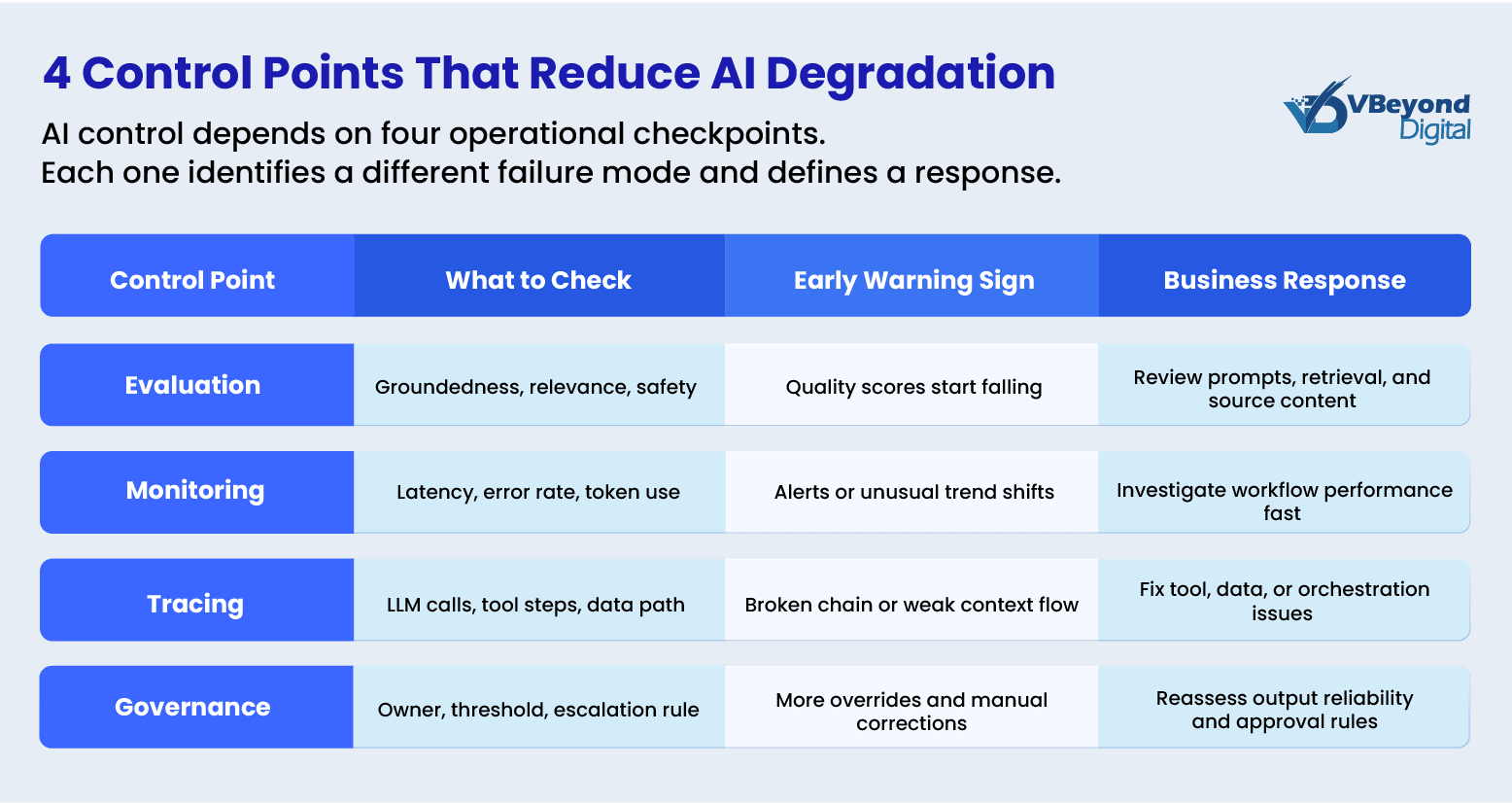
This is not a model problem. It is a control problem. The right response to AI degradation is not more dashboards alone. It is an operating model that ties output quality to business decisions, then monitors that quality over time. Microsoft’s current guidance supports this approach. In Microsoft 365, the Copilot Control System separates security and governance, management controls, and measurement and reporting into distinct pillars. In Azure AI, Microsoft Foundry supports production monitoring, quality evaluation, tracing, and alerts. Together, those capabilities point to a workable AI control framework for enterprises that need tighter Enterprise AI governance during copilot implementation.
The first step is to define workflow-level quality standards. That means setting clear thresholds for what counts as an acceptable summary, recommendation, answer, or action in each business process. Microsoft Foundry documentation states that teams can run built-in and custom evaluators against test datasets, including metrics for coherence, fluency, groundedness, relevance, safety, security, tool call accuracy, and task completion. That is the foundation of an AI assessment framework because it moves oversight from general copilot usage metrics to evidence about output quality and reliability. For example, a customer-facing summary may require >85% groundedness and zero factual conflict with source data, while internal drafts may tolerate lower thresholds.
The second step is live production monitoring. Microsoft states that Foundry monitoring can track token use, latency, error rates, and quality scores in real time, with alerts when outputs miss quality thresholds or produce harmful content. This is where Azure AI observability becomes central to managing AI model degradation and AI model drift. A CIO does not need another adoption report if the real issue is that customer-facing summaries are becoming less grounded, or that recommendations are becoming less complete. The control point has to sit at the workflow and output level. When quality scores fall below thresholds, workflows should trigger review, restrict automation, or route outputs for human validation.
The third step is tracing and root-cause review. Microsoft Foundry supports distributed tracing built on OpenTelemetry and integrated with Application Insights, giving teams visibility into LLM calls, tool invocations, agent decisions, and inter-service dependencies. That matters because many Copilot AI accuracy issues come from context assembly, retrieval quality, tool behavior, or source-data problems rather than the base model alone. If leaders want a serious Copilot governance model, they need to know whether a weak answer comes from missing content, poor grounding, a broken tool chain, or a prompt instruction issue. Tracing allows teams to isolate whether degradation comes from source data, retrieval logic, orchestration flow, or prompt design rather than the model itself.
What this looks like in practice:
- Set workflow thresholds: Define acceptable groundedness, relevance, completion quality, and safety for each high-value workflow so outputs can be evaluated against a clear standard.
- Monitor production quality: Use Azure AI observability to track quality scores, latency, token use, and operational errors over time so AI model deviations become visible before they affect decisions.
- Trigger intervention when thresholds fail: When outputs fall below defined standards, teams should review retrieval logic, validate source data, introduce human checks, or restrict automation depending on workflow criticality.
- Isolate root cause through tracing: Use tracing to determine whether degradation comes from data quality, retrieval gaps, orchestration issues, or prompt design, and fix the specific failure point.
- Assign ownership and escalation: Ensure each workflow has a defined owner responsible for monitoring signals, initiating corrective action, and escalating when decision reliability is at risk.
- Separate quality from adoption: Use Copilot usage metrics for activity tracking, but rely on evaluation and monitoring signals to assess whether outputs are reliable.
- Keep security in scope, not as the control layer: Security governs access and data protection, but output quality and decision risk must be managed through evaluation, monitoring, and ownership.
Conclusion: What measurement and ownership look like at scale
The core issue is ownership. AI degradation is not just a model issue. It is an ownership issue. Microsoft’s Copilot Control System is built around three pillars: security and governance, management controls, and measurement and reporting. Within that structure, Microsoft separates data security, AI security, compliance, privacy, and reporting into distinct control areas. That matters because strong Microsoft copilot security does not automatically resolve Copilot AI accuracy issues, AI model drift, or workflow-level AI risk. Security protects access, data handling, and policy boundaries. Governance and observability are what tell you whether the system is still producing business-safe outputs.
That is why mature Enterprise AI governance needs named owners, review cycles, escalation rules, and measurable standards for output quality. NIST’s AI RMF 1.0 and the Generative AI Profile both call for documented roles and responsibilities, ongoing monitoring, periodic review, and post-deployment risk management. In practical terms, that means every high-value AI workflow should have an owner who can answer four questions: what good output looks like, what failure looks like, what signals indicate AI model degradation, and what action follows when those signals appear. Without that discipline, copilot implementation stays active, but trust in the output becomes unstable.
What strong operating ownership looks like:
- A defined AI assessment framework for each critical workflow, with thresholds for groundedness, relevance, completeness, and safety
- A clear AI control framework that links security, observability, policy, and business review into one operating model
- Routine monitoring through Azure AI observability and Microsoft reporting surfaces, with action paths when quality slips
- Executive review that looks beyond copilot usage and asks whether AI is still supporting sound decisions at scale
This is where VBeyond Digital helps enterprises operationalize AI control. We help CIOs, CTOs, IT leaders, and product heads move from AI activity to AI control. We design workflow-level evaluation, monitoring, and governance models that connect output quality to business decisions. This includes Azure AI observability, Copilot control frameworks, and ownership models that make AI accountable in production.
FAQs (Frequently Asked Question)
AI degradation is a decline in answer quality, relevance, grounding, safety, or reliability over time, even while the AI system remains available and responsive in production.
Output quality can drop when source data becomes stale, incomplete, or lower quality, when context is weaker, or when responses vary because generative AI is nondeterministic. Microsoft also notes web and organizational context can improve response quality and relevance.
Set workflow quality thresholds, run repeatable evaluations, monitor production quality signals, and review traces for retrieval or tool failures. NIST also recommends post-deployment monitoring, user feedback capture, override paths, and incident response.
Track groundedness, relevance, coherence, fluency, safety, security, tool call accuracy, task completion, latency, token use, and error rates. These metrics help identify output-quality decline before business decisions are affected.
Treat outputs as unreliable when groundedness or relevance falls, users must frequently correct answers, responses conflict with trusted sources, or traces show retrieval and tool issues. NIST recommends acting when systems perform outside defined limits.

