


How to Enforce Azure Governance with Least-Privilege RBAC and Policy-as-Code
Section
- This blog uses Azure management groups as the enterprise scope model, so policy and access controls applied once are inherited by subscriptions for consistent guardrails.
- It implements RBAC Least Privilege by assigning Azure Role-Based Access Control to groups, keeping scopes tight, and using PIM eligible, time-bound activation for privileged roles.
- It operationalizes Azure policy as code by storing policy and initiative artifacts in source control, then testing, validating, and rolling out in stages using resource selectors and DoNotEnforce.
- This blog shows how to operate Azure governance safely using controlled remediation (Modify and DeployIfNotExists), time-bound exemptions, and compliance dashboards that support executive reporting and drill-down.
Introduction
Azure governance fails most often for a simple reason: access control and guardrails are changed in different places, by different teams, on different cadences. One person adjusts Azure Role-Based Access Control in the portal to unblock delivery. Another updates Azure Policy in a separate process.
Over time, subscriptions that should behave the same start to drift. Audit prep becomes a manual evidence hunt. Standing admin access expands because it feels like the fastest path to get work done.
This post lays out Azure governance best practices that tie those moving parts into one operating model. The reference approach starts with Azure management groups as the control plane for scope and inheritance, so shared guardrails can be applied once and flow to the right subscriptions. Microsoft positions management groups as the way to organize subscriptions and apply governance controls at scale.
From there, it pairs Role-Based Access Control (RBAC) Least Privilege with just-in-time activation through Microsoft Entra Privileged Identity Management, so privileged access is time-bound and approval-driven instead of permanent.
Finally, it operationalizes Azure policy as code, so policy definitions and assignments live in source control with review, validation, and repeatable rollouts, aligned with Microsoft’s recommended workflow.
Schedule your Azure Governance Workshop
Governance scope model and operating boundaries
Azure governance best practices start with one foundational decision: how your organization maps to Azure scopes.
Azure management groups sit above subscriptions and support hierarchical organizations, so you can apply governance controls at scale. In practice, a scope model is the difference between consistent Azure security governance and a portfolio where every subscription becomes its own rulebook.
A workable model aligns business structure to these layers:
- Tenant root: The top boundary for the directory.
- Azure management groups: Shared control planes for policy and RBAC inheritance across many subscriptions.
- Subscriptions: Workload and cost boundaries where teams build and operate services.
- Resource groups: Application boundaries for tighter scoping where needed.
Microsoft guidance also matters for scale. A management group tree supports up to six levels of depth, not counting tenant root or subscription levels. This makes hierarchy design a governance decision, not a diagram exercise. Overly deep structures become fragile because inheritance becomes harder to reason about and changes have wider blast radius.
A simple rule defines where governance belongs: shared guardrails at management group scope and workload ownership at subscription or resource group scope. That split lets Azure Role-Based Access Control and policy intent remain consistent while workload teams keep delivery autonomy.
The operating boundaries CIOs and IT Directors should set explicitly include:
1. Who can create subscriptions and where new subscriptions land by default.
New subscriptions are placed under the tenant root management group by default, and Azure provides hierarchy settings to set up a different default management group, so governance starts on day one.
2. Who can move subscriptions between management groups.
Azure documents how move permissions depend on where subscription ownership is assigned and inherited, which is why subscription moves must be tightly governed.
3. Which controls are preventive vs detective vs corrective.
Azure Policy effects include audit-style effects and enforcement effects such as deny and modify, and Microsoft recommends starting with audit-style effects to understand impact before enforcement.
4. How exemptions work and how long they last.
Azure Policy exemptions exist to waive evaluation for defined scopes or resources, so exemption approval and expiry must be part of Azure access management workflows, not ad hoc portal changes.
Least-privilege RBAC design that works at scale
In Azure governance, Azure Role-Based Access Control is the control surface that most often expands quietly over time. The pattern is predictable: delivery pressure leads to broad roles at broad scopes, then those assignments linger. RBAC Least Privilege reverses that pattern by designing roles, scopes, and approval paths that match how teams actually operate.
A minimal enterprise role model usually has three lanes:
1. Platform team: Limited standing privilege, with privileged access activated only when needed. Microsoft Entra Privileged Identity Management supports eligible assignments for Azure resource roles and can require approval for activation.Delegated approvers have a 24-hour approval window, which is not configurable, making it important to staff approvals across more than one approver.
2. Workload teams: Contributor at subscription or resource group scope, plus scoped custom roles when teams need narrower permissions than Contributor. Azure RBAC scopes inherit from management group to subscription to resource group to resource, so scoping decisions directly shape blast radius.
3. Security and audit: Reader for broad visibility, plus targeted roles for governance tooling. For Azure Policy operations and reporting, Microsoft documents that Resource Policy Contributor covers most policy operations and that Reader and Contributor have read access to Azure Policy operations.
Two scale constraints should shape how you assign roles. First, role assignments have hard limits: 4,000 per subscription and 500 per management group. Eligible role assignments do not count toward the subscription limit, and the management group limit is fixed.
Second, Microsoft’s Azure RBAC best practices recommend assigning roles to groups, not individual users, to keep assignments manageable and reduce assignment sprawl.
For privileged roles such as Owner, Microsoft recommends keeping subscription Owners to a maximum of three to reduce risk if an Owner account is compromised. For directory-wide emergency access, Microsoft documents emergency access accounts as “break glass” accounts and recommends maintaining two cloud-only emergency access accounts with the Global Administrator role.
Finally, design custom roles with management group realities in mind. Microsoft notes that you can define only one management group in a custom role’s assignable scopes, and custom roles with DataActions cannot be assigned at management group scope.
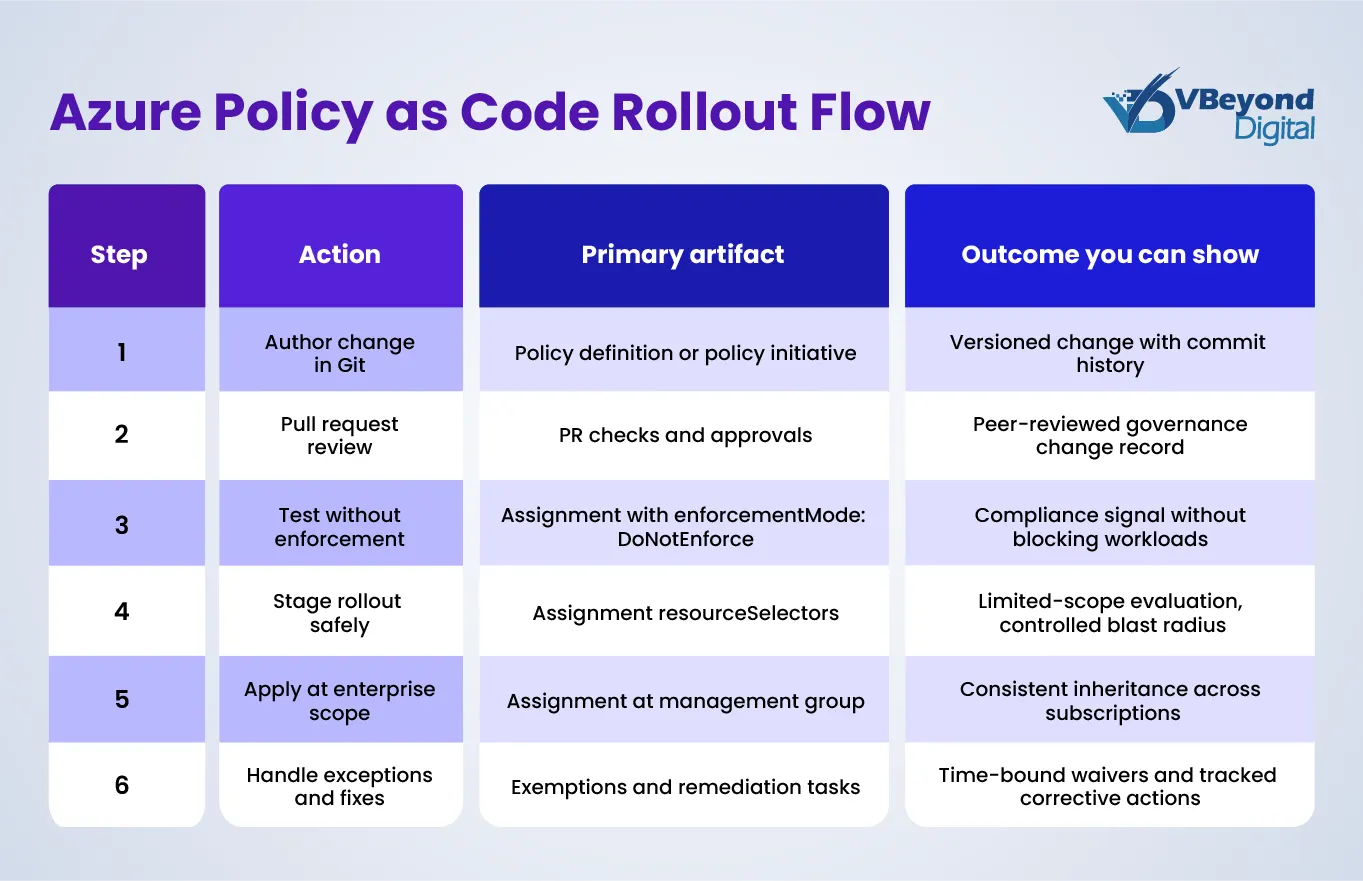
Policy-as-code workflow and repo structure
Policy changes are one of the highest sources of Azure governance drift because they are often edited directly in the portal with no peer review, no repeatable rollout plan, and no record of why an exception existed. Azure policy as code addresses that by treating policy definitions, Azure policy initiatives, assignments, parameters, and exemptions as versioned artifacts that move through the same engineering controls as application changes.
Microsoft’s recommended Azure policy as code workflow is explicit: store policy artifacts in source control, test and validate changes, then roll them out through automation.
1. Start with a repo structure that matches the Azure Policy object model.
Microsoft documents a file naming pattern that supports versioned policy and initiative definitions, plus separate files for parameters and rules, and JSON files for exemptions that target a scope or resource. This structure supports clear reviews because a change to policy logic is isolated from a change to parameters or assignment configuration.
2. Use a Git workflow that limits surprises in production.
For regulated environments, treat policy edits like any other production change: feature branch, pull request, required reviewers from platform and security, and required checks. In the validation stage, create or update assignments in a test management group branch with enforcementMode set to DoNotEnforce, which lets you evaluate compliance without triggering the policy effect.
To control blast radius, apply resourceSelectors so evaluation starts with non-critical tiers such as a single region or a narrow set of resource types; then expand selectors as results stabilize.
3. Pin versions when policy behavior must not shift unexpectedly.
Microsoft notes that assigning a built-in policy or initiative can optionally reference a version. If you do not specify a version, the assignment defaults to the latest and can ingest minor updates.
In ARM and Bicep, policy assignments include a definitionVersion property so you can set a specific version when required by change control.
4. Tooling options that map to your platform stack.
Microsoft’s Azure Landing Zones IaC Accelerator supports Bicep or Terraform based on Azure Verified Modules and integrates with GitHub or Azure DevOps pipelines; this makes it a strong foundation for Azure security governance automation.
Microsoft also states that Bicep AVM is now the default starter module for the accelerator and highlights an ALZ Library approach that separates policy data from rollout logic, reducing coupling between governance content and deployment mechanics.
If you want a policy-centric toolchain, EPAC supports CI/CD management of policies, policy sets, assignments, exemptions, and role assignments in one workflow.
Remediation, visibility, and safe operations
Azure governance best practices break down when compliance findings turn into an unplanned fix backlog. The remedy is a controlled remediation model plus disciplined exception handling.
Azure Policy supports corrective effects such as modify and the template remediation effect. Both can remediate existing resources through remediation tasks, and both require a managed identity on the policy assignment to run those changes.
Remediation tasks can target non-compliant resources across management groups, subscriptions, resource groups, or resource scopes, which support phased rollouts by business units or platform tiers.
Treat exceptions as first-class governance data. Azure Policy exemptions support an expiresOn date. When it is reached, the exemption remains for record-keeping but is no longer honored.
For visibility, pair Azure Policy compliance drill-down with tenant-wide governance reporting. The Azure Governance Visualizer accelerator runs AzGovViz on a timer via GitHub Actions using OpenID Connect, then publishes HTML and CSV outputs for leadership reporting and operational triage.
Conclusion
Effective Azure governance is an operating model, not a one-time configuration. Start by aligning Azure management groups to your enterprise structure so shared guardrails inherit cleanly into Azure Landing Zones and workload subscriptions. Pair that hierarchy with Azure Role-Based Access Control designed for RBAC Least Privilege, where privileged actions require just-in-time activation and approvals through your Azure access management process. Then run Azure policy as code so that changes to policy definitions, Azure policy initiatives, assignments, and exemptions are reviewed, tested with enforcement disabled, and rolled out in staged tiers.
Track outcomes that leaders can validate: fewer standing admin assignments, faster access approval cycle time, lower exemption count with clean expiry, and reduced compliance drift across subscriptions.
FAQs (Frequently Asked Question)
Azure governance is the processes and mechanisms used to keep control over applications and resources in Azure. Microsoft notes it is primarily implemented using Azure Policy and Azure RBAC.
Least-privilege Azure Role-Based Access Control supports segregation of duties and grants only the access required for a job, which reduces risk from excessive permissions.
Azure policy as code means keeping policy definitions in source control, then testing and validating changes, and integrating policy validation into CI/CD workflows.
Azure management groups provide a scope above subscriptions. You can organize subscriptions in a hierarchy and apply policy and access at the management group so subscriptions inherit those conditions.
Azure RBAC is authorization: it controls who can access resources and what actions they can take, scoped to a resource boundary. Azure Policy evaluates resource state against rules for compliance, independent of who made a change

