


Loading...
Section
Table of Contents
Key Takeaways
- This blog explains the operating model behind Oracle database Azure architecture, including how Oracle database services run in Azure datacenters with Azure-native access and telemetry.
- It breaks down the main production decisions across Azure networking, identity federation, monitoring, and governance for Oracle database Azure environments.
- The blog outlines how high availability, backup, and Oracle Data Guard fit into a production-ready recovery model for critical workloads.
Introduction
Oracle Database@Azure gives enterprises a direct way to run Oracle database services in an Azure environment while keeping application estates close to the database tier. For CIOs, CTOs, and IT leaders, the business value is clear: lower latency between Azure applications and the database, a more practical path for Oracle database modernization on Azure, and tighter operational alignment with existing Azure security and monitoring investments. Microsoft states that Oracle Database@Azure runs Oracle Database workloads in a customer’s Azure environment and supports Azure-native monitoring for metrics, logs, events, and telemetry.
That value comes with a technical tradeoff. Oracle database Azure architecture is not a standard single-plane cloud service model. Oracle describes the service as Oracle technology brought into Azure with Azure networking and Azure Virtual Network access, including services such as Oracle Exadata Database Service, Autonomous Database Serverless, Oracle RAC on Azure, and Oracle Data Guard. This means architecture decisions around Oracle Database on Azure networking, identity, monitoring, and recovery need to be made early, with clear ownership across platform, security, and database teams.
For business leaders, the real question is not whether Oracle database Azure can fit inside Azure. It is whether the organization can run it with enough control over scalability, data visibility, and operational risk. We bring clarity and velocity to your digital initiatives by helping teams turn that question into an actionable Azure deployment checklist grounded in architecture, governance, and measurable outcomes.
Network Design That Supports Scale, Security, and Application Proximity
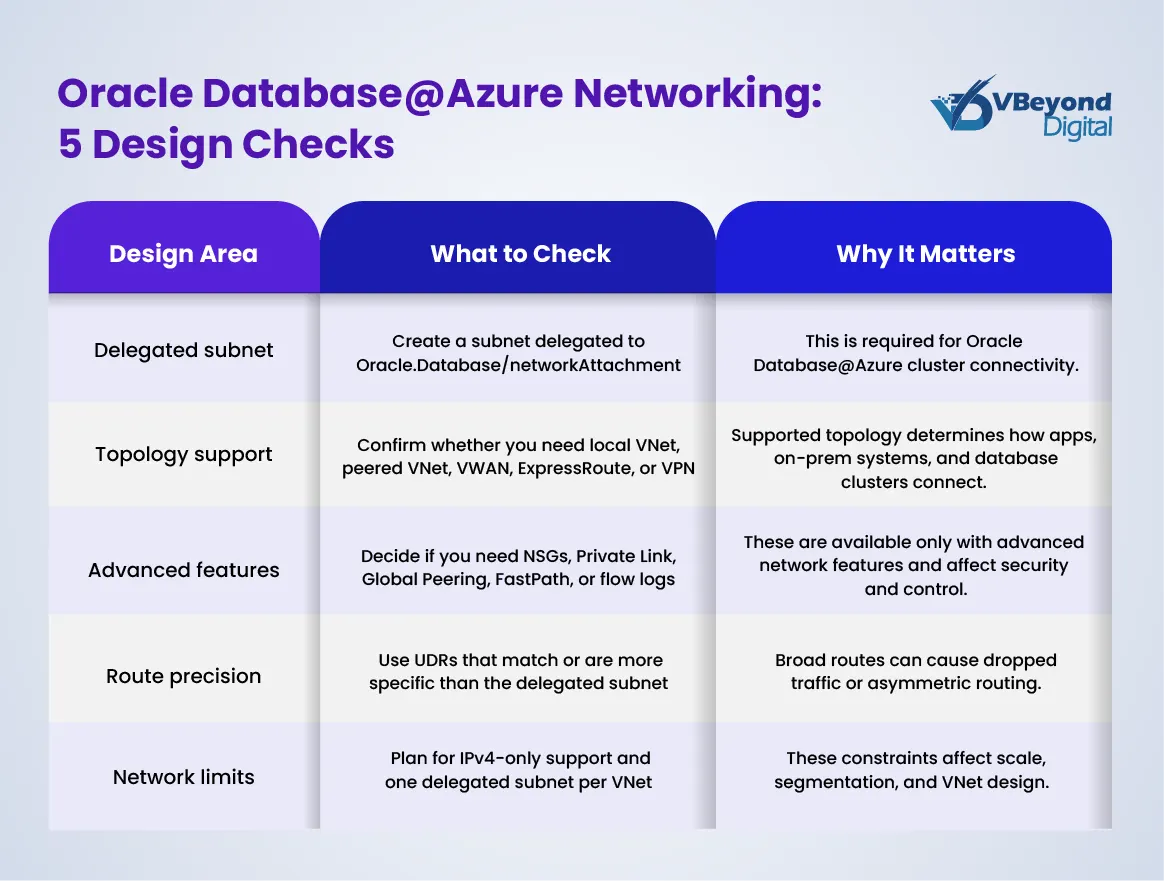
In Oracle database Azure architecture, network design is the first production decision that affects performance, security, and scalability. Microsoft states that Oracle database Azure clusters connect to an Azure virtual network through a virtual NIC from a delegated subnet tied to Oracle.Database/networkAttachment. That subnet shapes IP planning, routing, and firewall policy from day one.
Oracle describes the service as Oracle infrastructure placed inside Azure datacenters and linked to an OCI parent site. For business leaders, this supports a clear outcome: Azure-hosted applications can stay close to the Oracle exadata database tier, which helps reduce latency and avoids the overhead of a separate cross-cloud interconnect model.
Key network considerations include:
- Support for local VNet access, VNet peering, virtual WAN, ExpressRoute, and VPN connectivity for exadata on Azure.
- Advanced Azure networking features such as NSGs, Private Link, Global Peering, service tags, flow logs, and ExpressRoute FastPath for tighter segmentation and private connectivity.
- Delegated subnet planning that should be finalized early, since changes later can require reprovisioning.
- Oracle guidance that recommends at least a /27 client subnet for some Exadata-based patterns because of VM, SCAN, and reserved IP requirements.
Identity and Access Boundaries Need to Be Set Before Go-Live
In Oracle database Azure architecture, identity defines whether the platform stays controlled as usage grows. Oracle database Azure is bought and managed through Azure, but Oracle still runs the database platform and related service controls. That is why Microsoft recommends setting up federation before rollout and validating authentication, group sync, and policy behavior early. For CIOs and IT leaders, this is a governance issue as much as a security issue. Weak access design creates approval gaps, unclear production ownership, and slower incident response.
A workable model starts with clear role separation across the teams that run and consume the service.
- Azure platform teams should control subscription scope, policy, Azure networking, and logging.
- Database operators should manage Oracle database services, performance tasks, and lifecycle actions.
- Application teams should have limited access to the Oracle database service for Azure without infrastructure rights.
Microsoft also points to least-privilege Azure RBAC and highlights the need for custom access models in larger estates. That matters when production, non-production, and regional environments start to grow.
There is also an Oracle-side access model that cannot be ignored. Microsoft documents groups for database family administrators, readers, CDB administrators, and PDB administrators. This is especially relevant for Oracle RAC on Azure and other admin tasks that do not fit generic cloud roles.
A strong Azure deployment checklist should confirm:
- Federation is active and tested.
- RBAC matches team responsibilities.
- Oracle-side admin groups are mapped correctly.
- Key management and audit policy are reviewed.
Plan Your Rollout With Confidence
Operations and Visibility Across Azure and Oracle Tooling
The operational value of Oracle database Azure architecture depends on one outcome: teams need fast, reliable visibility across database health, infrastructure events, and security signals. In many enterprises, that is where complexity starts. Azure teams often monitor infrastructure, security teams track risk, and DBAs focus on database performance. If those views stay disconnected, incident response slows down and root-cause analysis becomes harder.
For Oracle database Azure, Microsoft supports log integration with Azure Monitor and Log Analytics for Oracle Exadata Database Service@Azure (for more information on implementation, read our guide “Implementing Oracle Cloud ERP Services: A Step-by-Step Guide”). That allows Oracle database services to feed operational data into the same monitoring estate already used for Azure applications and security operations. For leadership teams, this supports better control over data visibility, audit review, and operational accountability.
Key operational priorities include the following:
- Route Exadata and database logs into Log Analytics for centralized analysis.
- Use Microsoft Sentinel where security teams need shared incident workflows.
- Keep Azure Monitor focused on infrastructure, telemetry, and alert correlation.
- Keep Oracle tooling in place for SQL performance, wait events, and capacity analysis.
- Define who owns first response for platform alerts versus DBA alerts.
This dual-tool model is important for Oracle Database@Azure monitoring. Azure gives platform-wide visibility, while Oracle Database Management and related Oracle observability tools provide deeper insight for database operations. That combination is often the most practical model for exadata on Azure and broader Oracle database modernization on Azure programs.
A sound Azure deployment checklist should cover log routing, alert ownership, retention policy, escalation paths, and reporting requirements before production cutover. Whether the goal is an Azure managed Oracle database estate or a broader Oracle in Azure cloud strategy, operations need structure before scale.
Resilience, Recovery, and the Production Checklist
Resilience in Oracle database Azure architecture is not the same as basic uptime. Microsoft states that Oracle database Azure provides high availability against database instance and hardware failures by default, aligned with Oracle MAA silver level. But a single-zone setup has no fault tolerance for site or regional failures. For business-critical systems, that distinction matters because application continuity, audit exposure, and revenue risk depend on recovery design, not just local redundancy.
For Oracle database modernization on Azure, Oracle data guard is the main recovery mechanism. Microsoft documents support for Data Guard and Active Data Guard and recommends at least two Oracle Exadata Database@Azure instances with Data Guard to protect against single-site failures. Same-region, different-zone designs can support zero or near-zero RPO, while cross-region automated Data Guard uses Maximum Performance Mode, which is asynchronous.
A practical Azure deployment checklist for an Azure managed Oracle database should cover:
- Recovery scope: Define whether the workload needs zone-level or region-level recovery.
- High availability vs DR: Decide if Oracle RAC on Azure covers the requirement, or if Oracle data guard is required.
- Backup path: Choose OCI-managed backup, self-managed backup to Azure Storage, or another backup product based on RTO and retention needs.
- Testing: Run switchover and failover tests on a defined schedule.
- Ownership: Document who owns the runbook, cutover decision, and the Microsoft-Oracle support path.
This is where Oracle database services move from architecture into operating discipline. Without a tested recovery model, exadata on Azure remains technically available but not fully production-ready.
Conclusion
Oracle database Azure architecture gives enterprises a practical way to keep Azure applications close to critical Oracle workloads while retaining access to Oracle database services such as Oracle exadata database, Oracle RAC on Azure, and Oracle data guard. The business outcome depends on disciplined decisions across Azure networking, identity, operations, and recovery planning.
Microsoft and Oracle guidance shows that success comes from clear ownership, strong Oracle Database@Azure monitoring, and a production-ready Azure deployment checklist rather than ad hoc setup. From strategy to build, VBeyond Digital helps tech leaders turn Oracle database modernization on Azure into measurable outcomes with less operational risk.
FAQs (Frequently Asked Question)
It is an Oracle database service running on OCI infrastructure colocated in Microsoft datacenters. It uses Azure Virtual Network, Azure identity, and Azure-native telemetry, while Oracle operates the underlying database infrastructure and lifecycle tasks.
Oracle database clusters connect to an Azure VNet through a virtual NIC from a delegated subnet assigned to Oracle.Database/networkAttachment. Supported patterns include peering, ExpressRoute, VPN, and, for newer setups, advanced features like NSGs and Global Peering.
Microsoft recommends federation between Azure and OCI before rollout. The setup should validate sign-on, group synchronization, and policy enforcement, so access remains consistent across both platforms and role boundaries stay clear.
Azure Monitor and Log Analytics are used for centralized telemetry and log analysis, with Microsoft Sentinel available for security workflows. Oracle Exadata logs can also be routed to storage, Event Hubs, or partner tools.
Built-in HA covers instance and hardware failures, but site or regional recovery needs extra Oracle Exadata Database@Azure instances with Data Guard. Same-region zone designs can support zero data loss, while cross-region automated Data Guard is asynchronous.

