


Loading...
Dynamics 365 Customer Service needs operational ownership behind queues, SLAs, escalation paths, and reporting definitions.
Section
Table of Contents
- Configured Routing Still Leaves Ownership Undefined
- SLA Failures Start Where Queue Design Meets Capacity
- Reporting Breaks When Work Crosses Ownership Boundaries
- Exception Handling Is The Real Routing Control
- Release Motion Makes Routing Governance A Standing Discipline
- Case Routing Stays Operational After Go-Live
- FAQs (Frequently Asked Question)
Key Takeaways
- Why correctly configured Dynamics 365 Customer Service routing can still produce SLA disputes when queue ownership, capacity rules, and reporting definitions are not governed together.
- How to separate routing-rule defects from operating-model failures, so service leaders do not keep asking CRM administrators to fix problems that belong to process ownership.
- What evidence a customer service leadership team needs to review after go-live: routing diagnostics, overflow behavior, SLA exceptions, reassignment patterns, and dashboard logic.
- How to assess whether a Dynamics 365 Customer Service environment is mature enough to support high-volume routing without weakening escalation speed or reporting trust.
“The case met the routing rule.”
“The SLA still failed.”
“The dashboard does not show where the handoff stalled.”
Such a conversation usually starts after the team has already checked the obvious configuration. The queue exists. The workstream is active. The routing rule points to the right condition. The supervisor can see the case, and the CRM administrator can prove the record moved through the expected path. The disagreement begins because every team is looking at a different definition of success.
Dynamics 365 Customer Service gives enterprises the machinery to route work across queues, skills, capacity, channels, and assignment methods. The harder question is whether the organization has assigned accountability for what that machinery is supposed to protect. A routing model can distribute cases and still fail the service operation if queue ownership, exception handling, SLA interpretation, and reporting logic live in different parts of the business.
Microsoft’s 2026 wave 1 plan keeps Dynamics 365 Customer Service in active release motion, which means routing governance cannot be treated as a one-time design decision after implementation. The Dynamics 365 Customer Service 2026 release wave 1 plan was updated recently, and the product continues to move while enterprise service operations keep running.
Configured Routing Still Leaves Ownership Undefined
A fair objection is that routing ownership should already be clear if the implementation design was documented. In practice, the documentation often names the rule owner, not the outcome owner.
The difference matters because Dynamics 365 Customer Service routing sits between several operating groups. Customer service operations owns service performance. CRM administration owns configuration integrity. Workforce leaders own capacity. Reporting teams own dashboard definitions. Compliance and risk teams may own complaint or regulated-case handling. A routing rule can touch all of them without giving any one team the authority to decide when the rule should change.
Microsoft describes unified routing as the service that directs incoming work items to the right queue and agent based on routing conditions, assignment methods, and capacity. That product role is clear in Microsoft’s unified routing guidance. The enterprise control question starts after that product role is understood: who decides that the current routing logic is still the right logic for the service promise the business has made?
The recurring pattern in production Dynamics 365 Customer Service environments is that routing ownership is narrower than SLA accountability. A CRM administrator can maintain the rule, but cannot decide whether a VIP account should bypass a regional queue during staffing gaps. A service operations leader can see the SLA trend, but may not control the automation that reassigns the case. A reporting owner can explain the dashboard, but cannot prove why the underlying routing event happened.
This is where Dynamics 365 Customer Service operations need a governance model rather than a configuration list. The model should name who owns routing intent, who approves queue and capacity changes, who reviews exceptions, and who can declare that a report no longer reflects service reality.
SLA Failures Start Where Queue Design Meets Capacity
Queue design can look clean in a test environment because test volume rarely behaves like live work. The failure appears when capacity, urgency, skills, business priority, and reassignment timing collide during the operating day.
Microsoft’s queue model gives administrators the structure to group and distribute work, but the queue only expresses the operating assumptions that were designed into it. If those assumptions are stale, the queue will keep routing work according to a version of the service organization that no longer exists. Microsoft’s queue guidance for Customer Service explains queues as containers for routing work items to agents and teams. The governance issue is whether each queue still has a business owner who can defend its priority, staffing expectation, and escalation path.
This is why SLA failures often begin before the SLA timer becomes visible. A case can spend too long in the wrong queue, wait behind work with a lower business risk, or move through a reassignment path that satisfies the routing rule but misses the customer promise. The service leader sees a breach. The system owner sees compliant routing. Finance or commercial leadership sees the cost of service recovery. None of those views is false.
In production reviews, the most common gap is that queue logic and workforce reality drift apart quietly. A queue created for one team remains active after work has moved to another team. A priority rule assumes a capacity band that no longer exists. A skill rule routes cases to agents who are technically eligible but operationally unavailable. The rule is not broken. The organization around the rule has changed.
Microsoft now documents queue overflow as a configurable response to queue pressure, including conditions that determine when work should be routed elsewhere. Microsoft’s overflow guidance, updated recently, makes the control point visible. Enterprises still need to decide who is allowed to change overflow thresholds, how those changes are tested, and how service leaders know when overflow has shifted work in a way that changes SLA exposure.
Make D365 Routing Evidence Match SLA and Service Reports
Reporting Breaks When Work Crosses Ownership Boundaries
Dashboards can only explain the events they are designed to interpret. They cannot repair weak definitions of ownership after cases have crossed multiple queues, teams, and automations.
SLA reporting loses credibility when business users cannot reconcile the report with what supervisors saw during the day. A case may appear assigned on time while the customer experienced a delayed response. A transfer may be technically valid while the receiving team had no capacity. A dashboard may show average performance improving while a high-risk category keeps slipping through a narrow exception path.
The strongest reporting environments treat routing events as operational evidence, not just CRM data. That means the report must preserve enough context to answer which rule fired, which queue received the case, which team had capacity, which reassignment occurred, which SLA clock applied, and which exception path changed the outcome. Microsoft gives administrators diagnostic and analytics foundations for this work through unified routing diagnostics and conversation diagnostics data.
The reporting failure is usually organizational before it is technical. A Power BI owner can build an excellent service dashboard and still inherit definitions that no longer match how routing works. A customer service operations leader can challenge a metric and still lack access to the diagnostics needed to prove why the metric changed. A CRM team can export routing data and still miss the service question the dashboard is expected to answer.
This is where Power BI reporting governance becomes part of case-routing governance. SLA dashboards should not be treated as downstream reporting artifacts after the routing model is complete. They should be designed with the routing model so that service leaders can trace a breach from the visible metric back to the queue, rule, reassignment, or exception that produced it.
The reporting model also needs change control when the underlying analytics layer is customized. Microsoft’s analytics model customization guidance describes customization for historical and real-time analytics reports, which makes report-definition ownership part of service governance.
Exception Handling Is The Real Routing Control
No routing model will catch every service exception. The control maturity test is whether exceptions become evidence for improvement or disappear into manual workarounds.
The most fragile environments treat manual reassignment, supervisor intervention, and one-off automation fixes as operational noise. Those actions are often the clearest signal that the designed routing model no longer matches live service demand. If the same exception occurs repeatedly, the enterprise is no longer managing exceptions. It is running an undocumented routing layer beside the configured one.
The control sequence has to be explicit. A case first enters the queue logic. The routing rule then applies conditions, priority, skills, or capacity. If the case waits too long, overflow or escalation logic should respond. If the case is reassigned manually, that action should be captured as a governance signal. If the SLA report later shows a breach or anomaly, the team should be able to trace the path without reconstructing it from memory.
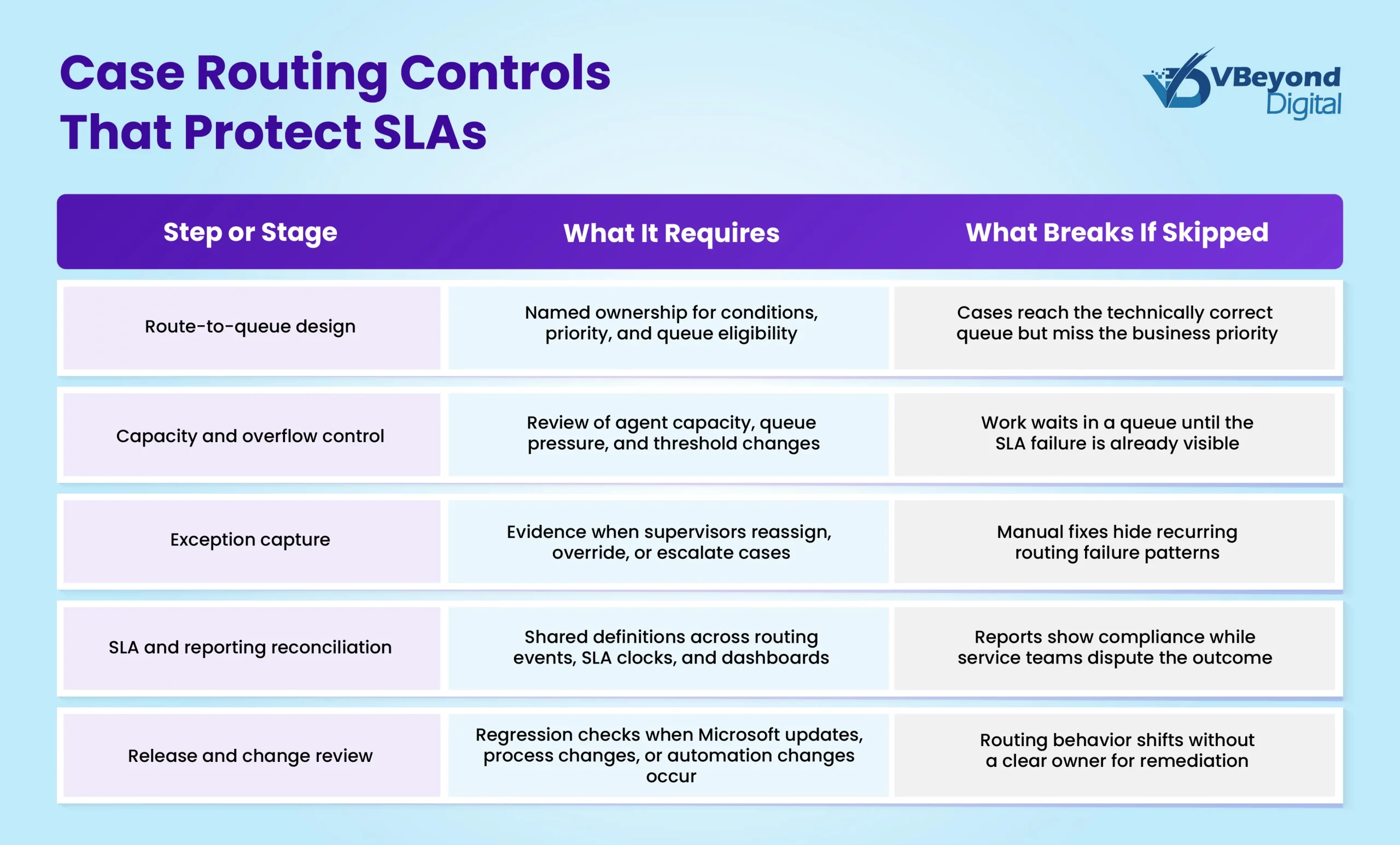
The table is sequential because order matters. A routing model that lacks exception capture will still look orderly in configuration. A reporting model that lacks routing evidence will still produce charts. The enterprise only sees the control gap when a case fails, a customer escalates, and each team can prove only its own part of the story.
Automation can help, but it should not become the silent owner of service accountability. If escalation workflows or approvals run through Power Platform, the same ownership rules need to apply to enterprise Power Platform governance and to any Power Automate escalation workflows that touch service commitments. Otherwise, a routing issue becomes an automation issue, and the service leader is still left reconciling the customer outcome after the fact.
Release Motion Makes Routing Governance A Standing Discipline
A release wave does not have to break service operations to create risk. It only has to change enough behavior, configuration dependency, or user expectation for an unmanaged routing model to lose precision.
Dynamics 365 Customer Service environments rarely stand still after go-live. Teams add channels, change case categories, revise SLAs, change staffing models, introduce automation, and adjust dashboards. Microsoft also continues to update the product through planned release waves. This creates a practical governance requirement: routing, SLA, and reporting controls need a review cadence that survives both business change and platform change.
The current product-currency check matters because Microsoft’s documentation around route-to-queue rules, overflow, diagnostics, conversation data, and release wave planning has continued to change through 2026. Microsoft’s May 2026 update to route-to-queue rule guidance, along with June 2026 updates to overflow behavior and routing diagnostics, indicate that the platform is still evolving. Enterprises should not assume a routing design created at launch remains fit for the next operating cycle.
The practical review model is not a large governance committee. It is a short, recurring review of routing changes, queue pressure, exception patterns, SLA disputes, reporting changes, and release-wave impact. The group should include service operations, CRM administration, reporting ownership, automation ownership, and any risk or compliance function attached to regulated cases.
The pattern across mature Dynamics 365 service operations is that release readiness sits closer to business continuity than to application maintenance. The teams that perform better do not wait for a breach report to ask whether routing still works. They review route changes, SLA exceptions, overflow signals, and reporting logic before small configuration changes accumulate into service disruption.
Case Routing Stays Operational After Go-Live
The opening disagreement does not fully disappear. A supervisor may still see the SLA breach, the CRM administrator may still prove the rule fired, and the reporting owner may still defend the dashboard logic.
The difference in a controlled environment is that the organization can now follow the evidence. It can show which queue received the case, which rule applied, which capacity condition existed, which exception changed the path, and which report definition interpreted the outcome. The unresolved work becomes visible enough to assign.
For a senior customer service operations leader, the implication is practical. If case routing is treated only as Dynamics 365 configuration, the business will keep discovering service risk through SLA misses and reporting disputes. If routing is treated as an operating-control discipline, the organization can decide who owns the rule, who owns the exception, who owns the report, and who owns the next correction.
VBeyond Digital’s Dynamics 365 consulting services can support a Dynamics 365 Customer Service routing and SLA governance assessment that reviews existing queues, routing rules, escalation paths, SLA definitions, reporting logic, and release-readiness controls. It is designed for enterprises that already run Dynamics 365 Customer Service and need to know where service accountability is breaking after go-live.
Some routing problems will still require judgment.
FAQs (Frequently Asked Question)
Rules can be configured correctly against the conditions they were given and still fail the service promise. The common cause is drift between queue logic, agent capacity, escalation paths, SLA definitions, and reporting expectations. The fix starts by naming the owner of the service outcome, not only the owner of the routing rule.
Customer service operations should own the service outcome, while CRM administration owns configuration integrity and reporting teams own measurement logic. The governance model should define how those owners approve route changes, review exceptions, and resolve disputes. A single technical owner is rarely enough once routing affects SLAs, customer commitments, and executive reporting.
High-volume environments should review routing evidence on a recurring cycle tied to SLA trends, queue pressure, manual reassignment patterns, reporting disputes, and Microsoft release waves. The cadence can be monthly for stable operations and more frequent during channel expansion, service redesign, or release readiness periods.
The evidence should include the route-to-queue rule that fired, the queue and capacity state at the time, any overflow or reassignment event, the SLA clock applied, the reporting definition used, and any manual intervention. Without that chain, the dispute becomes a debate between operational memory and dashboard output.
Power BI becomes part of SLA governance when service leaders depend on it for operational review, executive reporting, or customer-commitment tracking. The dashboard must reflect the same routing and SLA definitions used in Dynamics 365 Customer Service. If report definitions drift from routing behavior, trust breaks even when the underlying data is technically available.

