
Loading...
Section
- This blog shows how to plan D365 F&O Microsoft One Version updates in Lifecycle Services (LCS), using the Feb Apr Jul Oct cadence and sandbox-first seven-day validation.
- It explains an AI Operating Model that connects Dynamics 365 finance change, integration of health, and cloud reliability to outcome Service Level Agreements (SLAs) that leaders can review weekly.
- It outlines an AI Governance Framework aligned to NIST AI RMF Govern, Map, Measure, Manage, with ownership, approvals, monitoring, and audit evidence.
- It recommends Regression Suite Automation Tool (RSAT) regression plus integration checks and go-live scorecards to reduce post-update incidents during Microsoft Dynamics 365 updates for D365 F&O.
Introduction
For CIOs and CTOs running Dynamics 365 finance at scale, the hard part is rarely choosing the next initiative. It is running many initiatives at once without compounding risk: quarterly Microsoft Dynamics 365 updates under Microsoft One Version, new analytics products, automation in finance operations, and tighter expectations on cloud reliability.
Microsoft now ships service updates four times a year in February, April, July, and October. You can pause only one consecutive update, and sandbox autoupdates typically run seven days before production.
At the same time, GenAI research on Global Capability Centers shows measurable value is possible, but it is not automatic. In one BCG survey, over 40% of respondents reported operational savings above 5% to 10% of their GCC baseline from GenAI initiatives. The gap between pilots and sustained outcomes is usually an operating gap: unclear ownership across products and platforms, fragile integration paths, limited data visibility, and weak controls for models and data changes.
This is where GCCs can act as an AI value factory: a repeatable system that ties D365 Finance & Operations (F&O), analytics, automation, and cloud ops to measurable outcomes through an AI Operating Model and an AI Governance Framework.
Define the AI Value Factory operating model
Most GCCs struggle when D365 F&O work, analytics, and cloud ops run as separate queues with separate metrics. The result is predictable: Microsoft Dynamics 365 updates collide with month-end close, integrations fail quietly, and “automation” becomes a collection of scripts without controls. A value factory model fixes this by making ownership durable, tying work to outcomes, and running a cadence that matches Microsoft One Version.
1) Start with value streams and hard entry criteria –Treat work as three value streams that share the same governance:
(a) D365 F&O change and Microsoft One Version updates.
(b) Analytics products for Dynamics 365 finance.
(c) Cloud reliability plus Dynamics 365 automation.
Intake should require five artifacts before anything moves into build: a business outcome hypothesis, system and integration scope, data readiness, risk classification, and a measurement plan tied to outcome SLAs. This aligns to what GenAI research highlights as maturity drivers, including operating model, technology and data, and strategy and governance.
2) Run a cadence that matches One Version reality –Microsoft provides four service updates annually (Feb, Apr, Jul, Oct), allows pausing only one consecutive update, and will auto-apply the latest update after the pause window if you have not self-updated to a supported version.
In Lifecycle Services, you can set a recurring production update cadence and select a default sandbox that updates seven calendar days earlier, with an update calendar generated for the next six months. This is why the GCC needs a quarterly release plan, plus a weekly release readiness review that includes D365 F&O, integration owners, and cloud ops.
3) Clarify accountability through roles, not handoffs –BCG’s framework separates maturity into five dimensions, including Operating Model and People and Talent. In practice, that means named owners: a D365 F&O release owner, a data product owner for analytics, a platform engineering owner for integration and observability, an SRE owner for cloud reliability, and security and risk owners who can approve controls.
Plan your One Version updates
Platform and integration foundations that scale
When D365 F&O becomes the system of record for Dynamics 365 finance, integration design becomes the main predictor of stability during Microsoft Dynamics 365 updates. Under Microsoft One Version, you cannot treat integrations as one-off interfaces that “someone will fix after the update.”
Microsoft’s cadence makes integration risk recurring, so the platform foundation must reduce coupling, improve data visibility, and make failures observable.
1) Standardize integration patterns and stop hidden coupling
Use a small, explicit set of supported patterns and make each one owned, monitored, and tested:
- OData endpoints for synchronous reads and writes against updatable views in D365 F&O (OData V4).
- Business events for event-driven workflows, where external systems subscribe to notifications when business processes run. This is a strong fit for near real-time Dynamics 365 automation such as invoice posted, vendor approved, or payment status changed.
- Dual-write for tightly coupled, near real-time, bidirectional integration between finance and operations apps and Dataverse. Use it when you need shared operational data across ERP and Power Platform or customer apps and follow key-mapping requirements because entity keys must align on both sides.
- Data Management framework package REST API for recurring, file and package-based integrations where transformation and scheduling are part of the control surface.
2) Make integration and data issues observable in production
Production-grade operations require telemetry, not ticket-driven guessing. Microsoft documents how finance and operations apps can send telemetry to Azure Application Insights and provides a monitoring and telemetry overview with out-of-box signals.
In practice, the GCC should treat telemetry for D365 F&O integrations as part of the AI Operating Model and AI Governance Framework—every pipeline and interface has health metrics, alert thresholds, and an owner who is accountable for recovery.
Outcome SLAs and scorecards for analytics, automation, and cloud ops
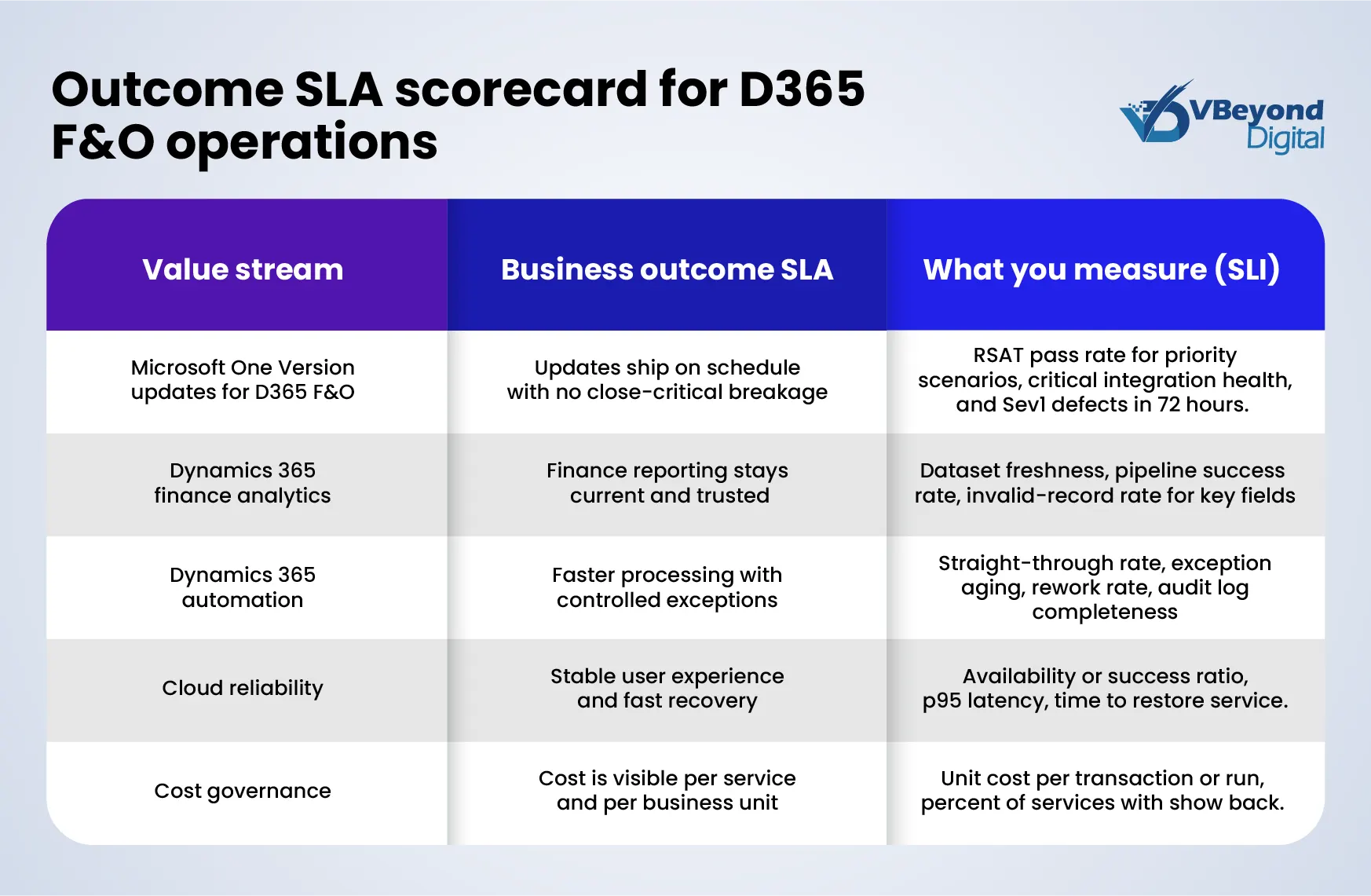
If your GCC is meant to act as an AI value factory, measurement cannot be activity-based. The operating model has contract outcomes. The clean way to do that is to separate three concepts:
- SLI: The metric you measure.
- SLO: The target range for that metric.
- SLA: The commitment you make to the business, backed by a response and escalation plan.
Google’s SRE guidance defines an SLO as a target value or range for a service level measured by an SLI, commonly expressed as “SLI ≤ target” or within bounds. Once you set an SLO, you can derive an error budget and agree on what happens when the budget is consumed.
1) Scorecard design principles for D365 F&O and Microsoft One Version
For D365 F&O under Microsoft One Version, the scorecard must connect Microsoft Dynamics 365 updates to business outcomes in Dynamics 365 finance:
- Impact scope: Which processes are revenue-critical, close-critical, or compliance-critical.
- Control points: Integrations, batch jobs, security roles, data entities, and downstream reporting.
- Service boundaries: Treat each interface and each “close workflow” as a measurable service.
2) Analytics SLAs that business leaders understand
Analytics SLAs fail when they only track report delivery dates. Track production signals:
- Freshness SLO: “GL balance dataset refreshed within X hours of source posting.” (SLI: minutes since last successful load)
- Pipeline success SLO: “Daily finance pipeline completes by X time on Y% of days.” (SLI: success ratio)
- Data quality gates: Error rate for critical fields such as legal entity, main account, posting date. (SLI: invalid records per 10,000)
These measures also support analytics risk management because they expose silent failures before they become finance exceptions.
3) Dynamics 365 automation SLAs tied to cycle time and control
Automation should publish outcomes, not script counts:
- Straight-through rate SLO: Percent of invoices processed without manual touch.
- Exception aging SLO: Percent of exceptions resolved within X business days.
- Control SLIs: Audit log completeness, approval latency, rollback time.
4) Cloud reliability SLAs and delivery stability
For cloud ops, use reliability SLOs plus delivery stability indicators:
- Reliability SLOs for availability, latency, and error rate, with an error budget policy that gates high-risk releases when reliability drops.
- Delivery stability using DORA-style measures such as change fail rate and time to restore service.
- Cost accountability using FinOps KPIs and unit economics where possible, so the GCC can report cloud cost per business unit or product.
5) Make One Version regression measurable, not aspirational
For Microsoft One Version readiness, track test outcomes as operational SLIs. Microsoft’s RSAT supports automated functional testing and integrates with Azure DevOps for execution and reporting, which fits quarterly Microsoft Dynamics 365 updates.
Core SLIs: Regression pass rate for close-critical flows, post-update incident count in the first 72 hours, and mean time to recover for integration failures.
Risk, controls, and model governance that stand up in audits
When a GCC runs D365 F&O as the system of record for Dynamics 365 finance, risk is not theoretical. It shows up as incorrect postings, unauthorized access, data drift in reports, and production incidents right after Microsoft Dynamics 365 updates under Microsoft One Version. The control model has to cover three layers together: ERP controls, data controls, and AI controls. This is what an AI Governance Framework looks like in practice.
1) Anchor governance to a recognized risk model, then map it to controls
The NIST AI Risk Management Framework defines four core functions for AI risk activities – GOVERN, MAP, MEASURE, and MANAGE – with governance designed as cross-cutting.
In an AI Operating Model, that translates into a short, testable control set:
- GOVERN: Named owners for each model, dataset, and workflow; a change approval path for production; incident ownership that matches cloud reliability targets.
- MAP: Documented intended use, users, and failure modes for each analytics and Dynamics 365 automation use case.
- MEASURE: Ongoing monitoring tied to business impact metrics, not only technical metrics.
- MANAGE: Rollback and containment actions for bad outputs, security events, or integration failures.
2) Use built-in Dynamics 365 finance controls as audit evidence, not as configuration
For segregation of duties, Microsoft provides setup guidance for SoD rules and reporting to identify role violations. That gives auditors a clear path from policy to detection.
For record-level change traceability, Dynamics 365 finance supports database logging configuration and maintenance, including constraints such as electronically signed records not being removable from logs.
3) Treat observability as a control, not just an ops tool
Microsoft documents telemetry signals and how finance and operations apps can send telemetry to Azure Application Insights. This is foundational for analytics risk management and cloud reliability because it creates time-stamped evidence of failures, latency spikes, and integration errors around Microsoft One Version updates.
Conclusion
A GCC becomes an AI value factory when it runs D365 F&O, analytics, Dynamics 365 automation, and cloud ops as one production system with shared ownership and outcome SLAs. That matters because Microsoft One Version runs on a fixed cadence of four service updates per year (February, April, July, October), with only one consecutive pause allowed, and a sandbox autoupdate typically seven days before production.
From strategy to build, VBeyond Digital helps tech leaders turn transformation into measurable outcomes, with less risk, across D365 F&O and Microsoft One Version change.
FAQs (Frequently Asked Question)
One Version updates are Microsoft-managed service updates for cloud D365 F&O environments. Microsoft releases four service updates annually in February, April, July, and October. A sandbox autoupdate typically runs seven days before the production update, creating a short validation window.
They keep D365 F&O within Microsoft’s supported update cadence. Microsoft limits you to pausing only one consecutive update and requires at least two updates per year. Also, LCS pause and delay options are not available if environments are more than one version behind the latest update, which reduces your control over timing.
Set and review your update configuration in Lifecycle Services, pick a default sandbox that updates first, and plan validation within the seven-day window. If you need more testing time, access the deployable package in LCS after the sandbox update and apply it when ready. Pair this with RSAT-based regression and targeted integration validation.
Treat the sandbox update as a production rehearsal: validate close-critical Dynamics 365 finance flows, run regression tests, and verify integrations. Schedule production updates in LCS outside peak business windows and monitor telemetry and integration health immediately after go-live.
Use a risk-based suite: automate high-volume and close-critical D365 F&O tasks with RSAT, run them for every Microsoft Dynamics 365 update, and keep expected values current. Use Azure DevOps integration for repeatable execution and reporting. Add integration tests for key interfaces and focused UAT for changed processes.

