

Dynamics 365 Finance & Operations vs Business Central: Which ERP is Best for You?
Section
Table of Contents
- Enterprise pain points the model must address
- Outcome-first narrative: What the GCC-to-GIC shift enables
- The AI pillar: From pilots to scaled capability
- The ESG pillar: Disclosure that stands up to audit and investor scrutiny
- Operating model upgrades that make GCCs credible innovation engines
- Conclusion
- FAQs (Frequently Asked Question)
- Dynamics 365 Business Central targets SMBs; Finance & Operations serves complex, high-transaction global enterprises.
- Business Central relies on tenant isolation; Finance & Operations utilizes a unified Global Address Book for intercompany control.
- Finance & Operations carries a 3x to 4x higher Total Cost of Ownership over five years than Business Central.
- Choose Business Central for agility and speed; select Finance & Operations for deep governance and advanced supply chain execution.
Selecting an Enterprise Resource Planning (ERP) system constitutes a foundational architectural decision for any enterprise. It is a choice that defines the organization’s operational boundaries, data liquidity, and long-term scalability. For Chief Information Officers (CIOs) and Chief Technology Officers (CTOs), the decision between Dynamics 365 Business Central and Dynamics 365 Finance & Operations (comprising Dynamics 365 Finance and Dynamics 365 Supply Chain Management) is not merely a comparison of feature lists. It is a strategic fork in the road between agility and capacity, between rapid deployment and granular governance.
Microsoft has bifurcated its ERP strategy to address two distinct market segments. Dynamics 365 Business Central targets the small to mid-market (SMB) sector. Rooted in the legacy Dynamics NAV (Navision) architecture, it prioritizes ease of use, lower Total Cost of Ownership (TCO), and rapid implementation. Conversely, Dynamics 365 Finance & Operations (F&O) serves the enterprise market. Rooted in the legacy Dynamics AX (Axapta) architecture, it is engineered for high-volume transaction processing, complex global supply chains, and rigorous financial governance.
This blog provides an exhaustive, technical comparison of these two platforms. It moves beyond high-level marketing descriptions to examine database structures, API throttling limits, manufacturing nuances, and the specific financial implications of the 2025 licensing updates.
Architectural Divergence: Kernel, Database, and Scale
The most significant differentiator between Dynamics 365 Business Central and Finance & Operations lies in their underlying architecture. This architectural divergence dictates how each system handles scale, concurrency, and data throughput. For a CTO, understanding these limits is essential to prevent performance bottlenecks post-go-live.
Dynamics 365 Business Central Architecture
Dynamics 365 Business Central operates primarily as a multi-tenant Software as a Service (SaaS) solution, although on-premises deployment remains an option. It is built on the Application Language (AL) codebase and utilizes a shared SQL Database schema where tenant data is logically separated.
1. Database Structure and Multi-Tenancy
In the Dynamics 365 Business Central model, the database structure is designed for isolation. Each “Company” within a tenant is treated as a distinct entity.
- Data Isolation: There is no shared master data table for vendors, customers, or items across companies by default. If an organization operates ten legal entities, a vendor record must exist ten times, once in each company table.
- Implication: To achieve a “Global Address Book” concept, organizations must rely on external synchronization mechanisms or data replication extensions. This impacts multi-entity visibility and increases administrative overhead for master data management.
2. Scalability Limits
Dynamics 365 Business Central is engineered for organizations with 10 to 500+ users. However, technical performance is often dictated more by transaction volume and concurrency than by user count.
- Transaction Volume: The system is capable of handling thousands of transactions daily. However, latency can become apparent in high-concurrency environments where multiple users attempt to post to the same ledger simultaneously. The locking mechanisms in the SQL backend can create blocking issues during peak operational hours.
- Storage Limits: As of the November 2025 pricing update, the base storage for the Essentials license has increasing from 2 GB to 3 GB, and for the Premium license from 3 GB to 5 GB. While this increase is beneficial, the relatively low base limit necessitates strict data retention policies or the purchase of additional database capacity.
Dynamics 365 Finance & Operations Architecture
Dynamics 365 Finance & Operations utilizes a robust, enterprise-grade architecture designed for high throughput. It operates on the X++ codebase and offers a highly scalable infrastructure that can be deployed via cloud (Azure) or hybrid models (Cloud and Edge).
1. Unified Database and Global Address Book
Unlike Dynamics 365 Business Central, F&O relies on a unified database architecture.
- Global Address Book (GAB): F&O includes a native Global Address Book that stores party records (customers, vendors, employees) globally. A single party record can be associated with roles in multiple legal entities.
- Shared Tables: Many configuration tables and master data entities can be shared across legal entities using the DataAreaId This facilitates true intercompany data sharing without replication, reducing database bloat and ensuring data consistency.
2. Scalability Capabilities
- Massive Throughput: F&O is capable of processing millions of transactions per day. It utilizes sophisticated batch processing frameworks that can be multi-threaded across multiple Application Object Servers (AOS). This allows for massive parallel processing of tasks such as MRP runs, financial journal posting, and inventory closing.
- Data Management Framework (DMF): F&O includes a high-performance DMF designed for high-speed data import/export. This framework is essential for enterprises that need to move gigabytes of data daily between the ERP and external systems (e.g., POS, eCommerce, legacy mainframes).
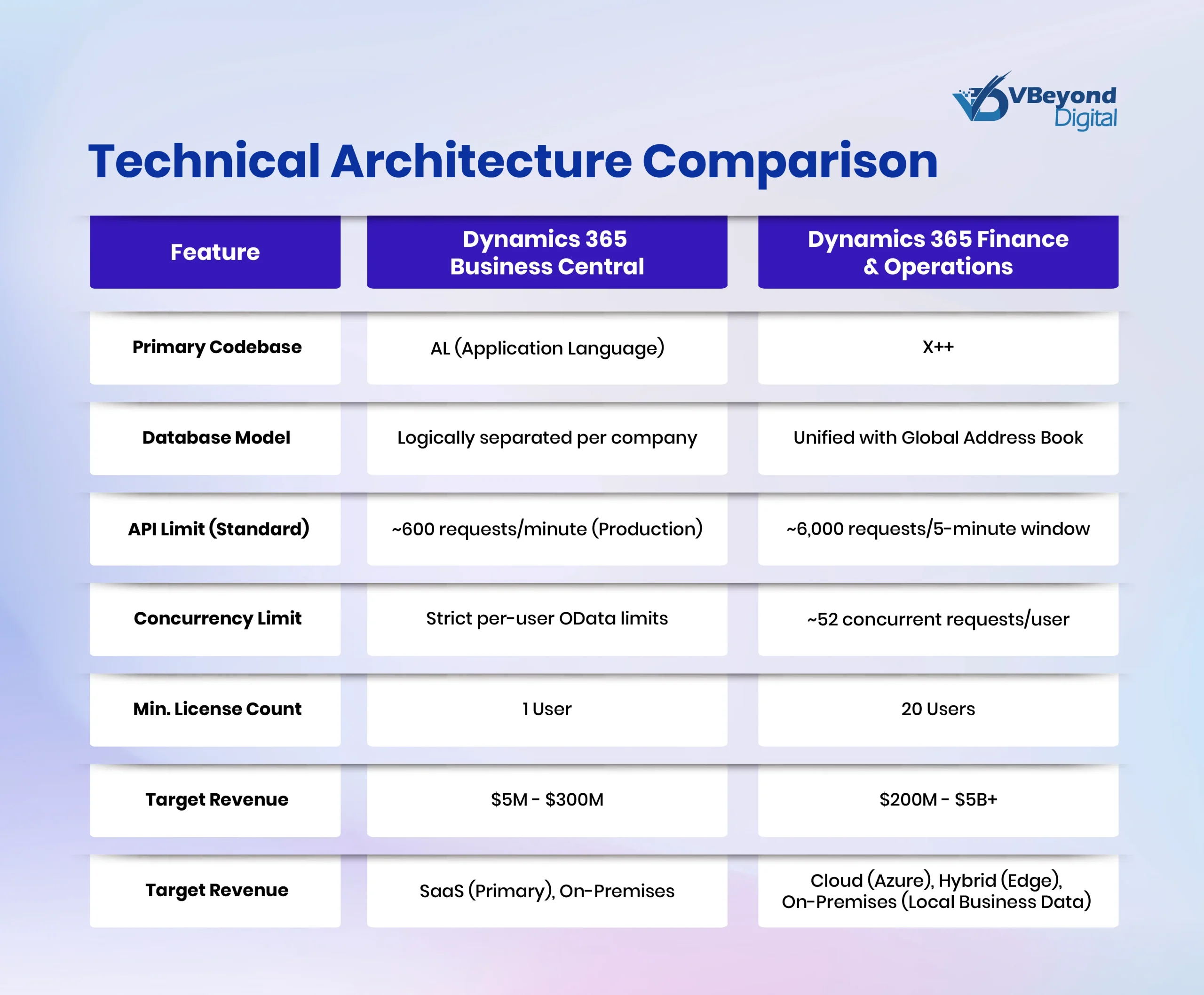
Technical Architecture Comparison
The following table summarizes the key architectural differences between the two platforms.
Financial Management: The Multi-Entity Divide
While both systems handle core ledgers – Accounts Payable (AP) and Accounts Receivable (AR) – proficiently, the divergence becomes apparent in complex, multinational financial scenarios. The choice between Dynamics 365 Business Central finance and F&O often hinges on the complexity of the corporate structure.
Multi-Entity Management and Consolidation
For organizations operating multiple legal entities, the handling of intercompany transactions and financial consolidation is a deciding factor.
1. Business Central: The Siloed Approach
In Dynamics 365 Business Central, the architecture treats each company as a distinct silo.
- Consolidation: Consolidation is possible but typically requires a specific “Consolidation Company.” Data must be exported from the subsidiary and imported into the consolidation company. This process involves mapping general ledger accounts from the source to the destination. While extensions and automated jobs exist to facilitate this, it is not a native, real-time view across entities.
- Intercompany Transactions: Basic intercompany transactions (such as Sales Orders and Purchase Orders between entities) are supported. However, the technical mechanism relies on an Inbox/Outbox messaging system. An intercompany purchase order in Company A creates a message that must be accepted in Company B to create the corresponding sales order. This lack of seamless, real-time posting can create friction in high-volume intercompany environments.
2. Finance & Operations: The Unified Ledger
F&O is designed with the complex enterprise in mind, supporting native multi-entity management within a single instance.
- Real-Time Consolidation: F&O supports a “Consolidate Online” feature for real-time aggregation of financial data. Furthermore, it integrates with “Financial Reporting” (formerly Management Reporter), which allows for the generation of consolidated financial statements without the need to physically move data between companies. It handles complex ownership percentages, minority interest eliminations, and multiple reporting currencies natively.
- Advanced Intercompany: The system features advanced intercompany journals. A user in Company A can post a journal entry that immediately creates and posts the corresponding entry in Company B, without the need for file transfers or message acceptance queues. It supports a shared chart of accounts and shared financial dimensions globally, ensuring consistency across the enterprise.
Supply Chain & Manufacturing: Discrete vs. Process
The distinction in manufacturing capabilities is often the primary trigger for choosing F&O over Dynamics 365 Business Central. Manufacturers with complex requirements will find the feature gap substantial.
Discrete vs. Process Manufacturing
1. Business Central: Discrete Focus
- Target: This includes Discrete Manufacturing (Assembly, Machining, Job Shops).
- Bill of Materials (BOM): It supports standard Production BOMs and Routings.
- Limitation – Process Manufacturing: Dynamics 365 Business Central struggles with process manufacturing concepts. It does not natively support formulas, co-products, or by-products. Dealing with “yield” (where input quantity does not equal output quantity due to evaporation or waste) requires workarounds or ISV solutions (e.g., Vicinity).
- Production Orders: Production orders are linear. Splitting a batch into multiple outputs is difficult to track natively.
2. Finance & Operations: Mixed Mode Capability
- Target: This includes Discrete, Lean, and Process Manufacturing (Mixed Mode).
- Formulas: Native support for Formulas (recipes) exists alongside BOMs. This enables the management of chemical or food ingredients, including potency management and batch balancing.
- Co-products and By-products: The system can plan and cost multiple outputs from a single production run. For example, in a dairy operation, processing milk produces cheese (main product) and whey (co-product/by-product). F&O allocates costs to these outputs based on configured ratios natively.
- Catch Weight: F&O features native support for catch weight (tracking items by two units of measure (e.g., cases and lbs). This is critical for food and beverage industries where inventory is sold by weight but managed by package. Dynamics 365 Business Central requires an ISV for this functionality.
Asset Management: F&O includes a full Enterprise Asset Management (EAM) module. This allows for the predictive maintenance of production machinery, integrated with IoT sensors to trigger work orders based on machine telemetry.
Supply Chain Planning (Master Planning)
1. Business Central: Planning Worksheet
Dynamics 365 Business Central uses “Planning Worksheets” to calculate Material Requirements Planning (MRP) and Master Production Schedules (MPS). While effective for SMBs, it runs as a monolithic SQL batch job. For larger datasets, this process can be time-consuming and is typically run overnight.
2. Finance & Operations: Planning Optimization
F&O utilizes “Planning Optimization,” a microservice that runs master planning in-memory outside the SQL database.
- Performance: This architecture allows for near real-time planning runs. A full regeneration of the master plan that might take hours in a traditional SQL-based engine can be completed in minutes, even with millions of transactions.
- Agility: This capability is a game-changer for high-volume distributors and manufacturers who need to react to intraday demand changes and run planning simulations without disrupting daily operations.
Warehouse Management: Bins vs. License Plates
The warehouse management capabilities represent a technical chasm between the two systems. For distribution-centric organizations, this area requires careful evaluation.
1. Business Central Warehousing
Dynamics 365 Business Central offers tiered warehousing complexity, ranging from “Basic” (no bins) to “Advanced” (Directed Pick/Put-away).
- Tracking Structure: Inventory is tracked by Location and Bin.
- Workflow: The system supports Picks, Put-aways, and Movements.
- The “License Plate” Gap: Dynamics 365 Business Central lacks the native concept of “License Plates” (LPs). An LP is a unique ID for a pallet or box containing mixed items. In BC, moving a pallet requires moving the item in quantities associated with that bin. There is no single ID that moves the entire group of contents.
- Mobile Scanning: BC does not have a native mobile WMS app. It relies on third-party ISVs (e.g., Insight Works, Tasklet Factory) to provide barcode scanning interfaces and logic.
- Wave Picking: BC does not support true “Wave Picking” (grouping multiple orders into a single picking wave to be released and processed together) out of the box. Users process shipments individually or via worksheets, which is less efficient for high-volume e-commerce fulfillment.
2. Finance & Operations Warehousing (WMS)
F&O includes an enterprise-class Warehouse Management System (Advanced WMS) module embedded within the ERP.
- License Plate (LP) Tracking: Native support for LPs allows for the movement of entire pallets (mixed SKUs) with a single scan. This is essential for efficiency in large distribution centers.
- Wave Processing: Sophisticated wave templates automate the release of work. Waves can be containerized, prioritized, and replenished automatically. The system supports “Cluster Picking” and “Zone Picking” natively, optimizing picker paths.
- Mobile App: Microsoft provides a native Warehouse Mobile App (available on Android/iOS) that is fully configurable via X++ or configuration. It supports real-time work execution and is built to withstand the connectivity challenges of large warehouses.
- Transportation Management (TMS): F&O includes a TMS for building loads, rating carriers (Rate shopping), and reconciling freight bills. Dynamics 365 Business Central requires ISVs for this level of functionality.
The 2025 Release Wave 2: AI Agents and Copilot
Both platforms are receiving significant AI investments as part of the 2025 Release Wave 2. However, the application of these features reflects the distinct target audiences of each platform.
1. Business Central AI (Copilot & Agents)
The focus in Dynamics 365 Business Central is on reducing manual data entry and assisting generalist users who wear multiple hats.
- Sales Order Agent: It is an autonomous agent that can read incoming emails, interpret unstructured requests (e.g., “Send me 50 red chairs”), verify availability, and draft a sales quote or order automatically. The aim is to increase the efficiency of sales administration teams.
- Analysis Assist: It allows users to query data using natural language (e.g., “Show me top selling items by region”) to generate ad-hoc reports without needing Power BI skills. This democratizes data access for SMB users.
- E-Invoicing Automation: The enhanced automation for reading and matching incoming electronic invoices (Payables Agent), reducing the manual burden on small finance teams.
2. Finance & Operations AI (Copilot & Predictive)
The focus in F&O is on risk management, supply chain resilience, and complex reconciliation suitable for large teams.
- Supply Chain Risk Management: Copilot integrates with external news feeds and weather data to proactively alert supply chain managers about disruptions (e.g., “Flash flooding in Michigan impacting tomato harvest”). It then drafts communications to affected suppliers, enabling proactive mitigation.
- Financial Reconciliation: The “Reconciliation Agent” autonomously reviews bank statements and credit card feeds, performing high-volume matching and detecting anomalies (e.g., fraud detection or duplicate payments). This supports the high governance requirements of enterprise finance.
- Demand Planning: The new “Demand Planning” app uses machine learning (XGBoost) to incorporate external signals (inflation, weather, promotions) into forecasts. This moves beyond simple historical regression to predictive planning.
Development Ecosystem: AL vs. X++
The “Last Mile” of any ERP implementation is customization. The technical differences here drive the cost of maintenance and the depth of possible modifications.
1. Business Central (AL Extensions)
Extension Model: Customizations are apps that sit on top of the base code. The base Microsoft code is immutable.
- Language: Application Language (AL), which is syntactically similar to Pascal. Visual Studio Code is the Integrated Development Environment (IDE).
- Upgradeability: Because base code cannot be modified, upgrades are generally automatic and low-risk. This lowers the long-term maintenance burden.
- Limitations: Developers cannot modify core logic flow easily; they must hook into specific “Events” exposed by Microsoft. If an Event doesn’t exist for a specific process, customization may be impossible or require a clumsy workaround.
2. Finance & Operations (X++ Extensions)
Extension Model: While Microsoft has moved F&O to an extension model to support “One Version” updates, the access to the core is significantly deeper.
- Language: X++, an object-oriented language similar to C# or Java.
- Complexity: Development requires a deeper understanding of the complex data models and frameworks (SysOperation, RunBase).
- Power: Developers have extensive control over the application behavior, enabling deep industry-specific modifications that might be restricted in Dynamics 365 Business Central. This power comes with a higher responsibility to ensure performance and stability.
Licensing, TCO, and Pricing Dynamics (2025 Updates)
The 2025 pricing updates have shifted the TCO calculus. CIOs must budget for these permanent operational expenditures.
1. Dynamics 365 Business Central Pricing (November 2025)
Effective November 1, 2025, pricing has increased . These changes reflect the added value of AI features and increased storage limits.
- Essentials: Increased from $70 to $80 per user/month. This license includes Finance, Supply Chain, Inventory, and Projects modules.
- Premium: Increased from $100 to $110 per user/month. This adds Manufacturing and Service Management modules to the Essentials capabilities.
- Team Member: Remains at $8 per user/month. This allows for read-only access and light tasks such as approvals and time entry.
- Device License: Increased to $45 per device/month. This is particularly useful for warehouse scanners or POS terminals shared by multiple shift workers.
2. Dynamics 365 Finance & Operations Pricing
F&O licensing is modular. A user typically needs a “Base” license and may need “Attach” licenses.
· Finance (Base): $210 per user/month.
· Supply Chain Management (Base): $210 per user/month.[SS1]
· Attach License: If a user needs both Finance and SCM, the second app costs $30 per user/month.
o Example: A Controller needing access to both financial ledgers and inventory costs pays $210 + $30 = $240/month.
Minimum Purchase: There is a 20-user minimum purchase requirement for the Finance or SCM base apps. This floor ensures that the platform is deployed for organizations of a certain scale.
[SS1]Convert to complete sentences.
3. Total Cost of Ownership (TCO) Analysis
The software license is often the tip of the iceberg. The implementation and ongoing maintenance costs diverge significantly.
- Implementation Multiplier:
- Business Central: Implementation typically costs 2–4x the annual license cost. Projects usually run 3–9 months, with costs ranging from $50k to $250k.
- Finance & Operations: Implementation typically costs 4–8x the annual license cost. Projects run 9–18+ months, with costs often ranging from $500k to over $2M.
- 5-Year TCO Scenario (100 Users):
- Business Central: Estimated ~$725,000 (Licensing + Implementation + Maintenance).
- Insight: The F&O path requires a significantly higher capital commitment. This is not just for licenses, but for the specialized consulting talent required to configure the complex parameters and the internal team needed to manage the environment.
Secure your data, scale AI.
Sustainability reporting has historically been a marketing function. It relied on estimates and manual spreadsheets. That period is over. The shift to regulated, audited non-financial reporting places the Global Capability Center at the center of corporate compliance. Finance and risk teams cannot produce the necessary data alone. They require the engineering capacity and data reach that only a Global Capability Center possesses.
What Changes in 2024 to 2025
The regulatory timeline creates immediate pressure for enterprise leaders. The Corporate Sustainability Reporting Directive (CSRD) requires the first cohort of companies to publish reports in 2025, covering financial periods beginning in 2024. This is a hard deadline mandated by the European Commission. It treats sustainability data with the same rigor as financial data.
Simultaneously, the International Sustainability Standards Board (ISSB) has established a global baseline with its S1 and S2 standards. These standards cover governance, strategy, risk management, metrics, and targets. They align closely with the Task Force on Climate-related Financial Disclosures (TCFD) recommendations. The convergence of these standards means that multinational organizations must produce consistent, high-quality data across all jurisdictions. A fragmented approach will fail. A unified Global Innovation Center approach provides the necessary cohesion.
What This Means for GCC Leaders
To meet these requirements, the GCC operating model must treat ESG data as a core asset. The center must build the infrastructure to support ESG Transformation across the enterprise.
- Data Controls and Entity Scoping: Auditors will test the boundary of the data. The Global Capability Center must design data platforms that clearly define which entities are included in the reporting scope. Value chain coverage must be explicit. If the data platform cannot distinguish between a wholly-owned subsidiary and a joint venture, the CSRD reporting will be inaccurate.
- Double Materiality Mapping: CSRD reporting requires a double materiality assessment. This involves analyzing how the business impacts the environment (impact materiality) and how the environment impacts the business (financial materiality). The Global Capability Center must codify this logic. Engineers need to map metrics directly to these materiality assessments. This creates a digital audit trail that explains why specific data points were collected and how they were calculated.
- Control Testing and Workflow Integration: The Global Capability Center must work with finance and risk teams to implement internal controls over sustainability reporting (ICSR). This involves automated testing of data pipelines to verify accuracy. Workflows must integrate with existing finance systems. When a sustainability metric is reported, it should flow through the same approval channels as a financial figure.
Example Data Products for ESG
A Global Innovation Center proves its value by building specific data products that solve these compliance challenges.
- Supplier Emissions Pipeline: Scope 3 emissions often constitute the majority of an organization’s carbon footprint. A Global Capability Center can build a pipeline that ingests supplier data, applies quality scoring, and calculates emissions based on spend or activity data. This product removes the reliance on rough industry averages and provides the granular data needed for ESG Transformation.
- Climate Scenario Inputs: Strategy teams need to model the financial impact of climate risks under different scenarios (e.g., 1.5°C vs. 4°C warming). The Global Capability Center can aggregate the necessary physical and transition risk data to feed these models. By providing high-quality inputs aligned to board-approved targets, the center enables the business to make defensible strategic decisions.
Operating model upgrades that make GCCs credible innovation engines
Structural changes must accompany technical upgrades. A Global Capability Center cannot deliver the results of a Global Innovation Center while using an outdated organizational chart. The hierarchy must flatten. The focus must shift from managing headcount to managing products. This requires a specific set of upgrades to the GCC operating model that prioritizes accountability and speed.
Roles and Accountability
Contracts and regulations set the playing field for Cloud cost management and Cloud exit strategy. Your teams need a precise view of what is possible, by when, and under which conditions.
The most critical shift is the move from project management to product ownership. In a traditional Global Capability Center, managers oversee timelines and budgets for projects defined elsewhere. In a Global Innovation Center, Product Owners sit within the center. They hold full authority over the roadmap, the backlog, and the user experience.
Platform ownership is equally important. Dedicated leaders must own the internal developer platforms that serve the wider enterprise. These owners are responsible for the stability and utility of the tools that other teams use.
Model risk management GCC functions must also be formalized. This role is no longer a side desk for a legal compliance officer. It requires technical leaders who understand AI architecture. These owners define the acceptable risk levels for AI deployments and have the authority to halt releases that violate safety protocols or data governance rules.
First-Class Teams: FinOps and MLOps
Operational disciplines that were once optional are now mandatory. FinOps and MLOps must exist as first-class teams within the Global Capability Center.
FinOps teams are responsible for the unit economics of the cloud. They do not just report on costs; they actively engineer cost reductions. They work with engineering teams to select the right instance types and manage reserved capacity.
MLOps teams manage the lifecycle of machine learning models. They build the pipelines that automate retraining and deployment. Without a dedicated MLOps function, the GCC to GIC shift will stall because data scientists will remain trapped in manual deployment cycles, unable to scale their work.
Metrics That Matter
The metrics used to evaluate a Global Capability Center must change to reflect this new reality. Service Level Agreements (SLAs) based on ticket response times are insufficient. The enterprise must track DevOps Research and Assessment (DORA) metrics to measure engineering efficiency:
- Deployment Frequency: How often is code successfully released to production?
- Change Failure Rate: What percentage of changes result in degraded service?
- Mean Time to Restore (MTTR): How quickly can the team recover from a failure?
Talent and Hiring Signals
The talent strategy must align with these operational changes. Hiring outlooks indicate that the expansion of centers will continue through the middle of the decade. Bengaluru and Hyderabad remain the leading hubs for this growth. However, the profiles being hired are changing. The demand is shifting away from generalist support roles toward specialized engineering and product talent. A Global Capability Center that fails to adjust its hiring criteria to target these specialized profiles will struggle to execute the GCC to GIC shift.
Conclusion
The evolution of the Global Capability Center is no longer a theoretical discussion. It is an operational necessity. The transition from a cost-based support hub to a value-driven Global Innovation Center is the only way to meet the dual demands of rapid AI industrialization and mandatory ESG Transformation.
The GCC to GIC shift requires more than just intent. It demands a structured plan for data, engineering, and reporting. VBeyond Digital helps technology leaders move from strategy to measurable outcomes. We provide the technical expertise and the operational blueprints necessary to build a credible Global Innovation Center. Whether you are establishing a new hub or upgrading an existing one, VBeyond Digital partners with you to build the products, platforms, and disclosures that define the modern enterprise.
Turn your Global Capability Center into an innovation engine today.
FAQs (Frequently Asked Question)
Historically, a GCC is a centralized hub designed as a cost-efficiency engine. Its primary function was to centralize back-office tasks and support functions to capture labor arbitrage for multinational enterprises.
A traditional GCC focuses on cost reduction and support tickets. A GIC focuses on value creation, generating intellectual property, owning product outcomes, and managing critical data risks like AI governance and ESG compliance.
The shift is driven by the need to industrialize Generative AI beyond pilots, meet mandatory ESG reporting deadlines (CSRD), utilize government R&D incentives, and move from a delivery silo to a product-led growth engine.
A GCC unifies fragmented data across business units to ensure lineage and traceability. It builds the platforms for double materiality mapping and automated control testing, producing the “investor-grade” disclosures required for audit.
Centers must shift from project management to true product ownership. They need to establish dedicated FinOps and MLOps teams and adopt engineering metrics like deployment frequency and change failure rates instead of simple volume SLAs.
