

Power Platform Governance at Enterprise Scale: Controlling Automation Sprawl Without Slowing Innovation
Section
Table of Contents
- Introduction
- Build an environment model that contains growth from the start
- Set connector and data controls before integration complexity grows
- Put production automations on a governed release path
- Run a CoE model with telemetry for apps, flows, and AI agents
- Conclusion
- FAQs (Frequently Asked Question)
Key Takeaways
- The blog explains how Power Platform Governance helps enterprises scale apps, flows, and AI agents without losing control of security, ownership, or compliance.
- It shows why citizen development governance starts with a clear Power Platform environment strategy instead of relying on the default environment.
- It outlines how Power Platform DLP policies, endpoint controls, and managed release paths reduce low code security risk in enterprise low code programs.
- It explains how Power Platform managed environments, Power Platform Pipelines, Copilot Studio Governance, and CoE Starter Kit telemetry support ongoing oversight.
Introduction
Power Platform Governance is not a control tax. In an enterprise low code program, it is the operating model that keeps delivery moving while reducing duplicate work, fragile automations, and audit exposure. Microsoft’s current guidance is explicit on this point: a tenant-level Power Platform environment strategy is the foundation for making adoption manageable and secure as environment counts grow. This strategy starts with routing makers to the right spaces and securing the default environment instead of treating it as the long-term home for everything.
That matters because citizen development governance is now an operating issue, not just an admin concern. When apps, flows, and agents spread across departments without a defined Power Platform environment strategy, teams can lose visibility into ownership, sharing, connector usage, and production risk. Microsoft’s own direction reflects that shift. On September 18, 2025, Microsoft said more than 4,500 customers had adopted Personal Developer Environments as a new environment strategy, signaling that default-environment-first adoption does not hold up well once enterprise low code usage starts to scale across business units.
The business case for low code security is broader than Power Platform alone. In the Cloud Security Alliance State of SaaS Security 2025 report, 63% of organizations reported external data oversharing, and 56% said employees uploaded sensitive data to unauthorized SaaS apps. Those findings matter here because automation sprawl, unmanaged connectors, and unsanctioned data movement often show up first as productivity wins and only later as governance failures.
Build an environment model that contains growth from the start
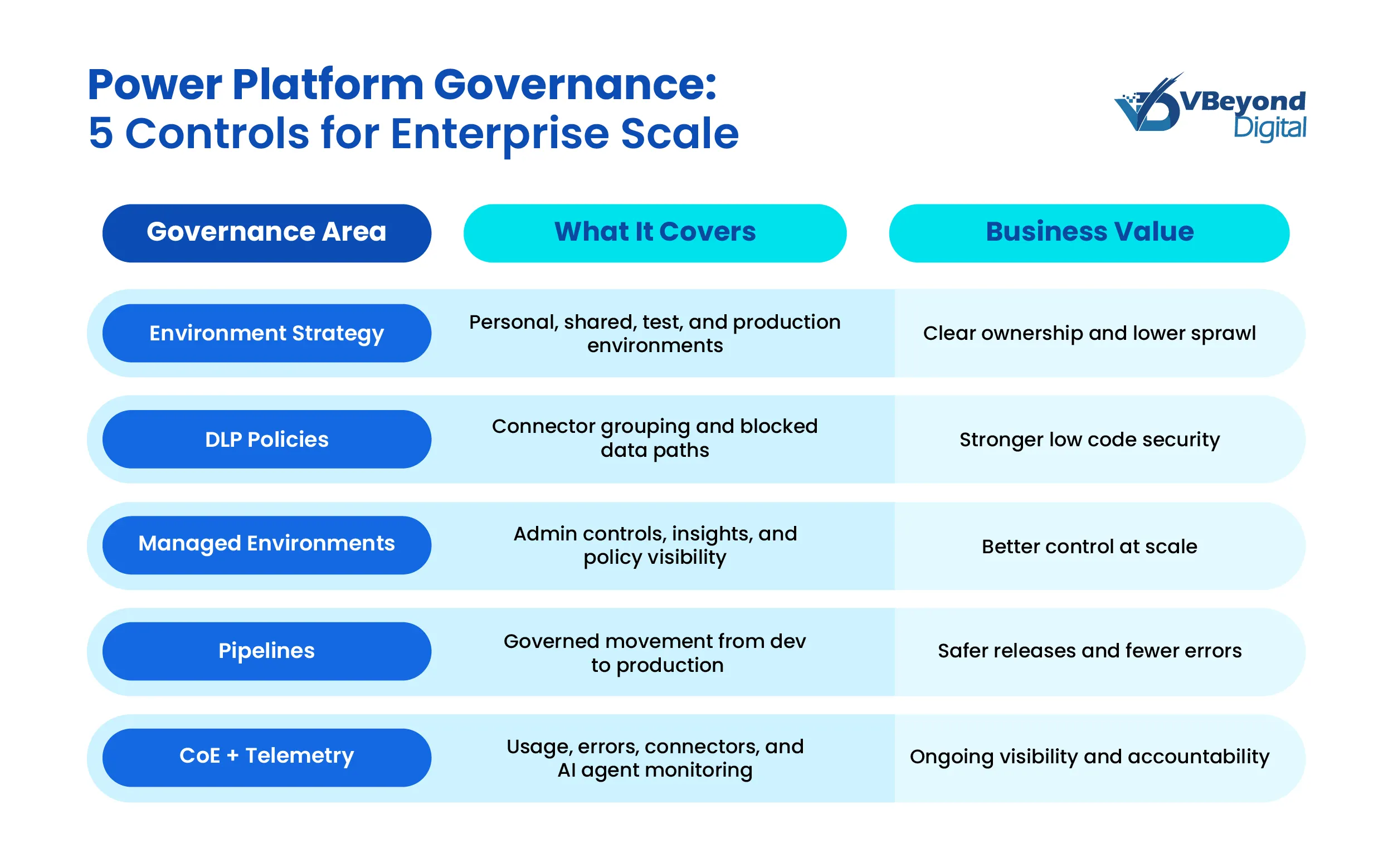
A strong Power Platform Governance program starts with one practical decision: where people build. Microsoft’s current Power Platform environment strategy guidance says environment planning is a core adoption decision, not an afterthought, because it shapes security, ALM, and admin control as the number of environments grows. The guidance also recommends moving makers away from the default environment, routing them into personal development spaces, and using Microsoft Dataverse for stronger security and ALM in the environments that matter most.
For enterprise low code teams, that leads to a simple model that scales well:
- Personal developer environments for individual makers building early versions of apps, flows, and agents. Microsoft says environment routing can automatically direct new or existing makers into their own personal developer environments when they open Copilot Studio, Power Apps, Power Automate, or Power Automate for desktop. Those routed environments are Managed Environments by default, which gives IT a cleaner starting point for citizen development governance.
- Shared development environments for team-based work where several makers need to build against the same solution. Microsoft’s guidance notes that shared development spaces are often the better fit when multiple makers are working on one enterprise app and need to avoid collisions while still collaborating closely.
- Separate test and production environments for business-critical workloads. This creates a clear boundary between build activity and live operations, which matters for low code security, support ownership, and release accountability. Microsoft’s tenant guidance ties this model directly to enterprise-scale administration.
This structure improves business outcomes in a very direct way. A broken flow in one maker’s workspace does not interrupt another team. Test data stays out of production paths. Ownership is easier to assign. Support teams can tell the difference between experimentation and a business-critical service. That is the real value of a Power Platform environment strategy in an enterprise low code program.
There is also a scale control that many leaders miss. Microsoft says environment groups are built for tenants managing anywhere from hundreds to tens of thousands of environments, with centrally applied rules and policies across grouped Managed Environments. That means Power Platform managed environments do not have to turn into one-by-one admin work as adoption grows.
Set connector and data controls before integration complexity grows
In Power Platform Governance, the biggest risk usually comes from data movement, not from the presence of a flow itself. A flow that reads supplier records from SQL Server, writes approved outputs to SharePoint, and stays inside approved boundaries is very different from one that can also post those records to personal email, consumer storage, or an arbitrary HTTP endpoint. That is why Power Platform DLP policies should sit near the front of any citizen development governance model, not near the end. This section follows the approved outline.
Microsoft’s current data policy guidance states that data policies classify connectors into Business, Non-business, or Blocked groups, and these classifications control which connectors can be used together in an environment. In practical terms, this is the first serious low code security boundary for enterprise low code teams. It stops approved business data from being mixed with unsanctioned services inside the same app, flow, or agent. Microsoft also notes that data policies apply across Power Apps, Power Automate, and Microsoft Copilot Studio, which makes them central to both Power Platform Governance and Copilot Studio Governance.
There is also a detail many teams miss when they build a Power Platform environment strategy. Microsoft says admins can set a default data group for new connectors after a policy is created and recommends keeping that default as Non-business until a connector is reviewed. This matters because the connector catalog changes over time. Without a default posture, new connector entries can weaken the intent of existing Power Platform DLP policies.
For tighter control, Microsoft’s guidance points to connector endpoint filtering. This feature lets admins govern which specific endpoints makers can connect to for connectors such as HTTP, HTTP with Microsoft Entra ID, HTTP Webhook, SQL Server, Azure Blob Storage, SMTP, Browser Automation, and UI Automation. However, Microsoft also states that endpoint filtering is a preview feature, and that rules are enforced only for static endpoints known at design time. They are not enforced for environment variables, custom inputs, or dynamically created runtime endpoints. Microsoft further notes that SQL Server and Azure Blob Storage endpoint rules are not enforced when those connections use Microsoft Entra ID in the affected pattern. So, endpoint filtering is useful, but it should be presented as an added control layer, not a full answer by itself.
Connector policy should then sit alongside boundary controls. Microsoft’s data-exfiltration guidance groups data loss prevention policies, IP firewalls, tenant isolation, and conditional access together as controls against unauthorized transfer of data. Tenant isolation governs movement of tenant data for connectors that use Microsoft Entra authentication, while IP firewall controls access to Dataverse from allowed IP locations and is available for Managed Environments with Dataverse.
Build governed automation with VBeyond
Put production automations on a governed release path
For Power Platform Governance, the goal is not more review meetings. The goal is a standard production path with clearer accountability, fewer late surprises, and less break-fix work after release. This is where Power Platform Pipelines becomes a practical control for citizen development governance and low code security. It gives enterprise low code teams a repeatable way to move apps and flows from build to test to production without handing broad production rights to every maker.
Microsoft’s current pipelines guidance draws a clear boundary around production promotion. Developer environments do not have to be Managed Environments, and the pipeline host itself does not have to be one, but all other environments used in pipelines must be enabled as Managed Environments. Microsoft also states that tenant admins can automatically convert pipeline target environments to Managed Environments; beginning in February 2026, Microsoft started enabling Managed Environments for pipeline targets that were not already managed. This makes Power Platform managed environments a real control point for production movement, not just an admin preference.
Power Platform Pipelines also supports a delegated release model. Microsoft says a pipeline stage can run as a service principal or as the pipeline stage owner instead of the requesting maker. That means a business analyst can request promotion without elevated rights in the target environment, while an authorized identity handles the actual stage run and approval. Microsoft further notes that this model supports custom approval logic through Power Automate and related Dataverse actions.
Run a CoE model with telemetry for apps, flows, and AI agents
Once the first controls are in place, Power Platform Governance becomes an operating discipline, not a one-time setup exercise. That is where a Center of Excellence (CoE) model matters. Microsoft’s current guidance draws a practical sequence for enterprise low code teams—start with the supported capabilities in the Power Platform admin center and Power Platform managed environments, then add the CoE Starter Kit when you need deeper inventory, reporting, and automation. Microsoft is clear that Managed Environments can work on their own or alongside the CoE Starter Kit. It specifically recommends starting with the out-of-the-box admin center and Managed Environments capabilities before adding kit features that fill gaps.
For apps and flows, the telemetry is already strong enough to support executive oversight. Microsoft says environment admins can use Power Platform admin center analytics to review runs, usage, errors, flow types (such as automated, scheduled, approval, and business process flows), as well as shared flows and connector usage. Power Apps admin analytics also provide environment-level usage, errors, and service-performance views for governance and change management. This is the data CIOs and IT directors need to spot fragile automations, shared-flow concentration risk, and connector patterns that deserve policy review.
At the tenant level, two admin-center surfaces are especially useful:
- The Security Overview page gives admins a centralized place to review security recommendations and a qualitative security score rated Low, Medium, or High.
- The Actions page analyzes managed environments and their apps, then recommends steps to improve security, reliability, and tenant health. It also supports action history, delegation, and automated remediation through the Power Platform for Admin v2 connector.
For Copilot Studio Governance, Microsoft now provides more direct controls than many leaders realize. Copilot Studio data policies can require user authentication, block public website knowledge sources, block documents or SharePoint knowledge sources, block HTTP requests, block use of Power Platform connectors as tools, and block event triggers. Microsoft also states that Purview auditing can record which knowledge sources users accessed and the text transcript of the conversation for authenticated-user interactions. In preview, automatic Entra agent identities add another identity layer by giving new Copilot Studio agents an Entra agent identity visible in the Entra admin center.
A CoE model matters most when scale rises quickly. Microsoft’s December 19, 2025, HEINEKEN customer story says the company had over 7,500 makers and more than 8,000 environments, managed by a product team of five people with Managed Environments as part of the governance model. This is not a universal benchmark, but it is a useful proof point that Power Platform Governance can stay workable at very large scale when telemetry, environment structure, and admin controls are tied together.
Power Platform Governance at enterprise scale is not about limiting citizen development governance. It is about putting apps, flows, connectors, and agents inside a model that supports ownership, production control, auditability, and data-boundary discipline. Microsoft’s current guidance across security and governance considerations, Power Platform managed environments, Power Platform DLP policies, admin-center security recommendations, and managed governance supports that position for enterprise low code programs.
Conclusion
Power Platform Governance at enterprise scale is not about limiting citizen development governance. It is about putting apps, flows, connectors, and agents inside a model that supports ownership, production control, auditability, and data-boundary discipline. Microsoft’s current guidance across security and governance considerations, Power Platform managed environments, Power Platform DLP policies, admin-center security recommendations, and managed governance supports that position for enterprise low code programs.
At VBeyond Digital, we help tech leaders bring clarity and velocity to digital initiatives by putting that model in place early. Power Platform can scale across business units, but only when environment design, connector policy, release control, and telemetry work together as a single system of governance.
FAQs (Frequently Asked Question)
Power Platform governance is the set of policies, roles, controls, and operating practices that guide how apps, flows, connectors, environments, and AI agents are built, released, monitored, and supported across the enterprise.
It matters because uncontrolled automation can create data exposure, weak ownership, connector sprawl, support issues, and audit risk. Governance gives enterprises a safer way to scale citizen-built solutions without slowing business delivery.
Key components include a Power Platform environment strategy, role-based access, Power Platform DLP policies, managed release paths, Power Platform managed environments, monitoring, ownership rules, and CoE operating practices.
Power Platform DLP policies improve governance by controlling which connectors can work together, blocking unsafe services, and reducing the chance that business data moves into unsanctioned apps, endpoints, or channels.
Yes. When environments, connector rules, approvals, and telemetry are built into a standard operating model, teams can build faster with clearer guardrails, less rework, and fewer production issues.
