


Loading...
Section
Table of Contents
- Introduction: Outcomes first, then product choices
- Clarifying naming and product scope up front
- The 90-day scoreboard: What to measure and how to attribute change
- Sales playbook in 90 days: Scenarios, data prerequisites, and KPIs
- Architecture and integration reality: What must be true for outcomes to show up
- Conclusion: What a CIO can commit to in 90 days
- FAQs (Frequently Asked Question)
- Start with a 90-day scoreboard linking Dynamics 365 Copilot usage to process change and business KPIs, not opinions.
- Align baseline Sales and Service metrics in week one, then run three high-frequency workflows that show measurable movement.
- Use Sales in Microsoft 365 Copilot, previously Microsoft 365 Copilot for Sales, to cut follow-up lag and improve pipeline readiness.
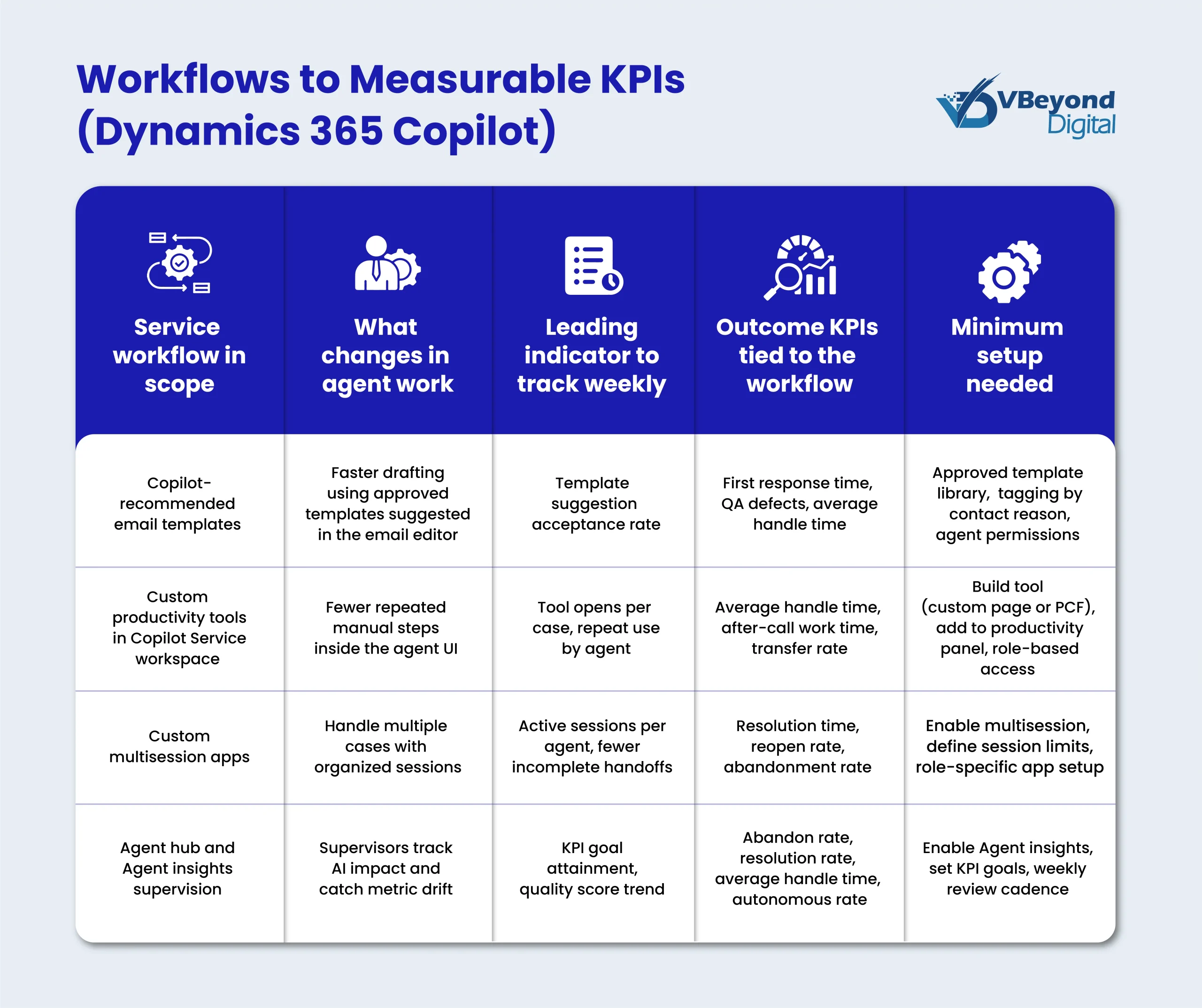
- Use Microsoft 365 Copilot for Service patterns plus Agent hub KPIs to reduce handle time, speed first response, and protect quality.
Introduction: Outcomes first, then product choices
CIOs are increasingly under pressure to show what changed within a quarter. GenAI is easy to pilot because it can create visible “wow” moments in days. It is harder to prove because the business question arrives fast: Did Sales create more qualified pipeline? Did Service reduce handle time? If the only answer is “people like it,” the program stalls.
This post is a practical playbook for turning Dynamics 365 Copilot capability into measured Sales and Service outcomes in 90 days, with attribution that holds up in an executive review. The core idea is simple: start with outcomes and instrumentation, then select a short list of high-frequency workflows that connect directly to those outcomes. Product features matter, but they only matter after you can measure change end to end.
Clarifying naming and product scope up front
Microsoft has renamed products so frequently that teams lose time just aligning terminology. For example, Microsoft notes that Microsoft 365 Copilot for Sales was rebranded in November 2025 as Sales in Microsoft 365 Copilot, with videos and screenshots updated over time.
Sales in Microsoft 365 Copilot is designed to bring CRM context into the Microsoft 365 apps sellers use daily, including Outlook and Teams.
In this blog, when we say Dynamics 365 Copilot, we are talking about role workflows across Sales and Service that connect Dynamics 365 data to day-to-day work, plus the adoption and measurement patterns required for Microsoft Copilot implementation that a CIO can defend.
The 90-day scoreboard: What to measure and how to attribute change
Most GenAI pilots fail the same executive question: what changed in the business? The fix is a scoreboard that links Dynamics 365 Copilot usage to operational behavior, and then to KPI movement. Microsoft’s Copilot Analytics and Viva Insights templates are built around this idea, including a Copilot Business Impact report that relates usage behaviors to business outcome measures when you bring your KPI data into the model.
The measurement chain (what your dashboard must show)
Track a simple chain, week over week:
1. Usage and proficiency signals –Feature use, frequency, repeat use, and scenario coverage (who used what, how often).
2. Process change signals:
Sales:Meeting-to-follow-up time, CRM update latency, activity capture completeness.
Service: First response steps completed on time, template acceptance rate, fewer context switches.
3. Business KPI movement –The small set of Sales and Service KPIs you committed to in week 1.
This chain is the foundation for Microsoft Copilot ROI discussions because it shows the causal path you are testing, not just adoption graphs.
Baseline plan (week 1, no exceptions)
- Pick 3 to 5 KPIs per function, with an agreed definition and a named owner.
- Capture current-state ranges by segment (region, role, queue), not just a single average.
- Document the operating cadence: weekly for Service, monthly for Sales pipeline.
Instrumentation basics you will need
- CRM activity capture consistency (email, meetings, tasks) so Sales workflows are measurable.
- Service case lifecycle events (create, assign, first response, resolve) so queue metrics are comparable.
- A small set of Microsoft 365 Copilot adoption signals tied to scenarios for Microsoft Copilot implementation, including Microsoft 365 Copilot for Sales and Microsoft 365 Copilot for Service usage where relevant.
Attribution rules that prevent false ROI
- Compare like-for-like cohorts (pilot vs control when possible).
- Use time windows aligned to operating cycles.
- Treat perception-only claims as weak evidence, which is why objective KPI linkage matters.
Proof point (reference, not a promise): Microsoft reported internal results after adopting Copilot for Sales, including +9.4% per-seller revenue, +5% opportunities per seller, and +20% individual win rates.
Build your 90-day scorecard now
Sales playbook in 90 days: Scenarios, data prerequisites, and KPIs
A Sales program with Dynamics 365 Copilot should be judged on two things in 90 days: did seller time move toward customer work, and did pipeline hygiene improve enough to change conversion and forecast confidence. That requires selecting a short set of workflows that sellers run every week, then tying each workflow to one process signal and one KPI.
Outcomes to target in a 90-day Sales cycle
Pick 2 to 3 measurable outcomes that map to your operating rhythm:
- More seller time on customer work – Track activity mix and admin time proxies such as CRM update latency and meeting follow-up time.
- Faster progression from lead to opportunity – Track stage conversion and time-in-stage for early pipeline.
- Better pipeline review readiness – Track fewer “unknown” fields, fewer stale next steps, and fewer records missing stakeholders.
These outcomes are realistic when Microsoft Copilot implementation starts with scenario owners, data readiness gates, and weekly scorecard reviews.
Workflow set that maps to measurable results
Start with three high-frequency scenarios that connect Microsoft 365 and Dynamics 365 surfaces:
1. Meeting preparation and follow-up inside Microsoft 365
Sales meeting prep insights are generated automatically for upcoming meetings, and surface in the Sales agent experience.
2. Opportunity and account summaries inside Dynamics 365 Sales
The new summary experience’s early access was available from July 2025, with general availability started from September 2025.
3. CRM context and email assistance where sellers work
Copilot in Dynamics 365 Sales is available as an Outlook add-in and a Teams app, so sellers can capture, view, and update CRM data in daily tools.
In the Sales app, context-aware email content suggestions are supported in Outlook.
Data prerequisites and common blockers
CIOs usually hit the same friction points, and they are measurable:
- Integration complexity: Sellers need Dynamics records visible in Teams and Outlook context, not locked behind tabs.
- Entity mapping and data quality: Duplicate accounts, missing stakeholders, and inconsistent activity logging break attribution.
- Minimum viable data readiness checklist
- Account and opportunity ownership rules are clear.
- Required fields for your three scenarios are populated consistently.
- Activity capture rules are documented by role.
90-day execution cadence (Sales)
- Days 1 to 15: Baseline by role and region, data readiness checks, and “done” criteria per scenario.
- Days 16 to 45: Pilot with one role or region, weekly scorecard, fix data gaps fast.
- Days 46 to 90: Expand only after the scoreboard is stable, then add one new scenario at most.
Sales KPIs and leading indicators (examples, not promises)
- Pipeline: Opportunities created per seller, stage conversion, time in stage.
- Execution: Meeting-to-follow-up time, CRM update latency, activity capture completeness.
- Outcomes: Win rate and revenue per seller, tracked on a longer window than the pilot.
Architecture and integration reality: What must be true for outcomes to show up
A 90-day program built around Dynamics 365 Copilot only produces measurable results if the architecture supports two things at once: sellers and agents can access the right CRM context inside their daily tools, and the underlying systems record enough signals to attribute change. If either side is weak, Microsoft Copilot ROI conversations turn into opinions.
Integration complexity to address early
Start by documenting where “truth” lives for core entities, then map that truth into the collaboration surfaces where work happens.
- Data location and ownership
- Accounts, contacts, opportunities, and cases: System of record, mastered fields, and duplicate handling rules.
- Identity: How users authenticate across Dynamics 365, Microsoft 365, and Teams, and what role-based access means for AI-assisted views of data.
- Mapping CRM entities to collaboration context
- Dynamics 365 and Teams integration is designed to let users view and collaborate on Dynamics 365 records directly in Teams, which is where many sales and service interactions already happen.
- For seller workflows, activity capture is the practical bridge between meetings and emails and the opportunity record. Dynamics 365 Sales “auto capture” provides activity suggestions for emails and meetings based on Outlook data, which supports measurable activity consistency when configured well.
- Sales in Microsoft 365 Copilot is positioned to bring CRM insights into Outlook and Teams, so the integration goal is simple: CRM context must be reachable where sellers work, not only inside the CRM UI.
- Microsoft also documents saving Outlook emails and meetings back into the CRM via the Sales app, which is a key requirement if meeting prep and follow-up scenarios are part of your Microsoft Copilot implementation.
Data visibility requirements that directly affect KPI movement
For each workflow in scope, define the minimum required fields and logging behavior.
1. Standard fields populated consistently for the scenarios you picked (for example, opportunity next step, close date, stakeholders, case category, priority).
2. Activity capture strategy that is explicit: what gets logged, by whom, and when, plus what “good” logging looks like in reporting (for example, meeting and email linked to the right account and opportunity).
3. Service knowledge sources with ownership so agents pull from approved content. Dynamics 365 Customer Service supports authoring, reviewing, and publishing knowledge articles, and those articles are available in both Customer Service Hub and Copilot Service workspace.
Scalability concerns to plan for in week 1
- Rollout sequencing: Expand one role, one region, or one queue at a time, only after the scorecard is stable.
- Change control: Cloud updates shift user behavior, so treat updates as an operational input. Microsoft documents Dynamics 365 service updates and a release schedule that includes two annual release waves; this means you should plan testing and communication as part of your operating model.
What “good” looks like by day 30
- A stable KPI dashboard tied to workflow telemetry and process signals.
- A short workflow catalog with named owners and acceptance criteria, including AI workflow optimization checks (time saved, fewer steps) and AI risk management checks (access control, output review paths).
- A repeatable intake process for new scenarios that forces a scoreboard link before adding scope.
Conclusion: What a CIO can commit to in 90 days
You can prove measurable outcomes from Dynamics 365 Copilot within one quarter when you start with a scoreboard, then run a short scenario list end to end. The difference between a pilot that gets applause and a program that gets funded is attribution: usage signals connect to process change, and process change connects to KPI movement through Copilot Analytics and the measurement and reporting pillar of Microsoft’s Copilot Control System.
FAQs (Frequently Asked Question)
Yes, if you start with a scoreboard in week one and limit scope to a short workflow list. Use Copilot Analytics and the Copilot Control System measurement model to track usage signals, process changes, and KPI movement. For Service, weekly queue cycles make early movement visible faster. For Sales, focus on leading indicators (follow-up time, CRM update latency, pipeline hygiene) within the 90-day window, and track revenue impact on a longer cycle.
Dynamics 365 Copilot brings AI assistance into Dynamics 365 Sales and Customer Service workflows, with CRM context available in day-to-day tools. For Sales, Sales in Microsoft 365 Copilot brings CRM insights into Outlook and Teams, supporting meeting prep and follow-up actions. For Service, Microsoft 365 Copilot for Service patterns support faster drafting and consistent responses, with supervisor visibility through Agent hub dashboards for agent performance and customer metrics.
Measure ROI by linking business outcomes to adoption patterns, not by counting prompts. The Copilot Control System measurement and reporting pillar supports readiness, productivity impact, and business value reporting through Copilot Analytics. In Viva Insights, the Copilot Business Impact report lets you upload your own business outcome measures and compare frequent vs infrequent Copilot use against those outcomes. Use cohort comparisons (pilot vs control when possible) and segment results by role, region, or queue.
You can usually see leading indicators within 2 to 4 weeks if instrumentation is correct and the workflow list is small. Service outcomes can show sooner because first response time, handle time, and reopens move on weekly cycles. Sales KPI movement takes longer, so the 90-day goal is measurable process improvement: faster follow-up, cleaner activity capture, and better pipeline readiness. Those signals make Microsoft Copilot implementation credible and set up later gains in win rate and revenue per seller.
Start with access control and data boundaries for each workflow, then add operational controls. Microsoft’s Copilot Control System frames governance, management controls, and measurement as a single operating model. For Service, Agent hub and agent insights dashboards provide KPI monitoring for AI agents. Add a QA rubric for customer-facing output (accuracy, relevance, completeness) and a change review cadence for product updates, so Microsoft 365 Copilot adoption stays stable while scaling.

