


Loading...
Section
- This blog explains how to run Azure AI FinOps for Azure OpenAI and GPU workloads, translating tokens and compute spend into product-ready AI unit economics.
- Azure AI FinOps links token telemetry with Azure Cost Management exports, so teams drive Azure cost allocation by feature and environment.
- It matters to finance because Azure OpenAI cost per token and throughput limits drive run-rate, margin, and forecasts, but do not show up in VM metrics.
- You get practical controls: token budgets, prompt and caching patterns, batch processing, plus Microsoft Azure GPU quota and capacity planning, backed by CFO-auditable reporting.
Why Azure AI FinOps is a business problem first
Azure FinOps for AI is not a “cloud bill hygiene” exercise. For most enterprises, Azure AI FinOps becomes a board-level topic the moment AI features move from pilots to product. The outcomes leaders usually want are straightforward:
- Predictable run-rate for AI features that ties spend on demand signals, not surprises at month end.
- Margin visibility by product capability, so “AI search” or “AI agent assist” has a measurable unit cost.
- Fewer billing surprises by catching token and GPU drivers early.
- Credible forecasts that a CFO can reconcile to invoice line items and planning models.
AI spend behaves differently than classic cloud for one core reason: Azure OpenAI is token priced, and the bill is driven by prompt and completion token volume, not VM averages or storage growth curves. Azure’s pricing structure is explicitly token-based and commonly distinguishes between input and output tokens. In practice, that means two apps with identical request counts can land with very different Azure AI cost, depending on response length, context size, retries, and orchestration patterns.
Get CFO-ready Azure AI FinOps
CFO-Grade Unit Economics
In Azure FinOps and Azure AI FinOps, the conversation gets productive when cost is expressed as a unit cost tied to business value, not as a monthly lump sum. The practical goal is simple: convert Azure AI cost into unit economics that product, platform, and finance can all be used in planning.
Start by defining a small set of units that match how the business measures volume and outcomes:
- Tickets: Cost per resolved ticket for support copilots and agent assist
- Documents: Cost per document processed for intake, summarization, extraction, classification
- Leads: Cost per qualified lead for enrichment, outbound personalization, SDR assist
Once a unit is defined, work backward to the billable drivers. For token-billed services, the base metric is AI cost per token, and it must reconcile the invoice. Azure publishes Azure AI pricing for Azure OpenAI as token-based, with separate pricing for input and output tokens.
Azure OpenAI cost per token formula (invoice-reconcilable):
- Export cost and usage data from Azure Cost Management to storage for repeatable reporting.
- From the export shaped to the FinOps Open Cost and Usage Specification (FOCUS) schema, compute:
- Cost per token = BilledCost / ConsumedQuantity (where consumed quantity is tokens)
- Roll up to unit economics:
- Cost per ticket = (avg tokens per ticket × cost per token) + allocated platform and overhead
- Repeat for documents and leads, using measured tokens per event
Simplified cost taxonomy for AI unit economics
- Token costs
- Online inference tokens (input and output), batch tokens, and any reserved throughput charges where applicable
- Allocation basis: Feature tag, environment tag, model or deployment identifier, subscription, resource ID
- Microsoft Azure GPU costs
- Training, fine-tuning jobs, evaluation runs, batch inference on GPU VMs
- Allocation basis: Job tags (team, product feature, environment), cluster name, schedule window
- Platform costs
- Storage, vector stores or indexing, logging and metrics, API gateway, networking
- Allocation basis: Shared-cost split by unit volume (tickets, documents, leads) or token volume
- Overhead
- Security tooling, platform engineering run costs, governance Azure processes
- Allocation basis: Fixed monthly split plus a variable split tied to unit volume
- Allocation basis: Fixed monthly split plus a variable split tied to unit volume
Two practical CFO-facing notes that keep AI unit economics credible:
- Finance will challenge “model A is cheaper.” Bring the cost per successful ticket, document, or lead, with sensitivity to response length and retries, since these directly change tokens and therefore AI cost per token-driven spend.
- Provide a reconciliation path: Unit-cost reporting should tie back to Azure Cost Management for exports and the same resource and tagging dimensions used for chargeback.
A Copilot accountability scorecard becomes a long-running management tool only when the platform design can support three needs at the same time: scale (many users and many data sources), refresh reliability (consistent updates without manual steps), and controlled access (leaders see what they need, and sensitive data stays protected).
Microsoft Fabric and Power BI can support this pattern when you treat the scorecard as a governed analytics product, not a one-off report.
Data Visibility & Reporting
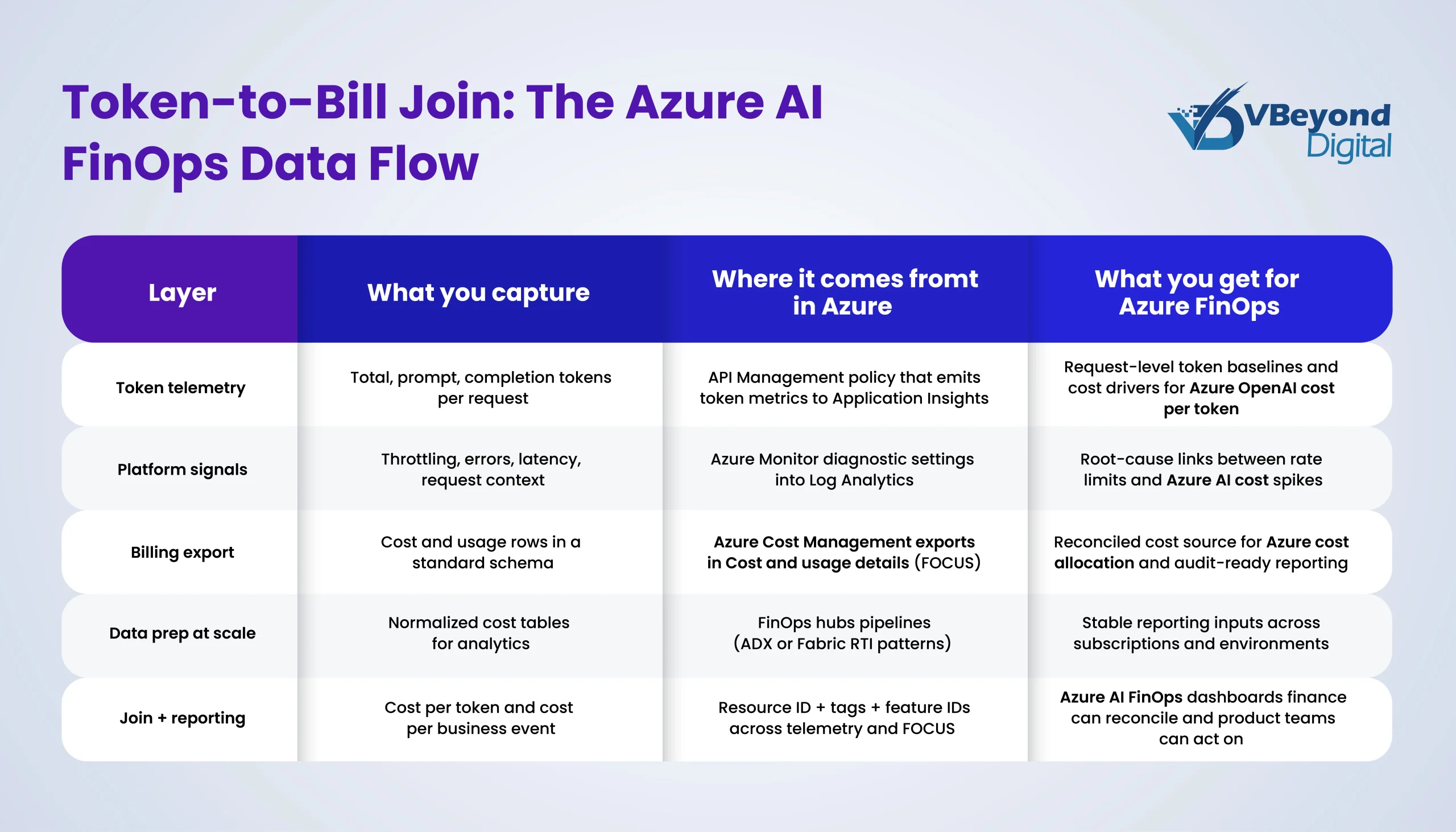
In Azure AI FinOps, trustworthy reporting comes down to one idea: join token telemetry to billing exports so every chart can be traced back to both a request record and an invoice line. Without that join, teams argue about averages and samples. With it, you can report Azure OpenAI cost per token, cost per feature, and Azure cost allocation in a way finance can reconcile and audit.
Here are three practical takeaways that work across most enterprise Azure footprints.
1. Use Azure Cost Management exports in FOCUS format
Azure Cost Management exports are the cleanest way to pull cost and usage data at scale into storage for repeatable reporting.
When AI is in the mix, pick Cost and usage details (FOCUS), so the dataset follows a consistent, open schema and semantics. Microsoft documents the FOCUS export option and the fields available in the cost and usage details file.
Practical notes:
- Treat the export as your source-of-record input for finance reporting.
- Keep exports scoped by billing account or subscription strategy that matches your reporting needs.
- Store exports in a landing zone that supports access controls and retention.
2. Capture token telemetry with APIM or Azure Monitor
To calculate AI cost per token by feature, you need token counts at the request time.
Two low-friction patterns are:
- API Management: The azure-openai-emit-token-metric policy sends token metrics to Application Insights, including Total Tokens, Prompt Tokens, Completion Tokens.
- Azure Monitor: Azure OpenAI metrics can be exported using diagnostic settings, with analysis in Log Analytics via KQL.
3. Design the join around Resource ID and consistent tags
Avoid fragile joins based on display names. Use:
- Resource ID as the primary join key between telemetry and billing rows.
- A small set of required tags used everywhere (cost center, environment, product feature) so that governance Azure policies and reporting match how teams operate.
For larger environments, the Microsoft FinOps Toolkit and FinOps hubs provide a standardized ingestion and reporting foundation on top of Cost Management exports.
Cost-Per-Token Drivers & Controls
In Azure FinOps and Azure AI FinOps, the most reliable way to reduce AI cost per token is to treat tokens like a governed consumption metric, not an abstract billing unit. These four levers show up repeatedly in production systems, and they map cleanly to Azure OpenAI for cost per token reporting and Azure Cost Management reconciliation.
1. Design for input vs output token pricing
a. Azure OpenAI pricing commonly charges different rates for input and output tokens, so long answers can cost disproportionately more than short, structured outputs.
b. Controls that work:
i. Set explicit response length targets per feature (example: “3 bullets plus one action”).
ii. Use structured outputs where possible, so responses stay bounded.
iii. Track “output tokens per business event” as a first-class KPI in your governance Azure scorecard.
2. Stop context window creep before it becomes your biggest line item
a. The FinOps Foundation highlights the “context window tax” as a major cost driver, especially in multi-turn chat and agent flows.
b. Controls that work:
i. Summarize older conversation state and pass the summary forward, not the full history.
ii. Cap retrieval payload size (number of chunks, total characters) and measure task success, not just recall.
iii. Monitor prompt tokens p50 and p95 per request, so you catch runaway prompts early.
3. Make prompt concision a standard, measurable requirement
a. FinOps guidance reports that adding “be concise” can reduce token usage and cost by about 15% to 25% on average.
b. Controls that work:
i. Test version prompts and changes against both quality and token deltas.
ii. Put token targets in PR reviews for prompts and agent workflows.
iii. Report token savings in the same dashboard as feature outcomes to support AI unit economics.
4. Use caching and batch processing for repeatable or offline work
a. Prompt caching can reduce cost and latency for repeated prompt prefixes.
b. Semantic caching in Azure API Management can serve similar requests from cache to reduce backend processing.
c. For offline workloads, the Azure OpenAI Batch API supports separate quotas and a 24-hour target turnaround at 50% less cost than the global standard.
GPU Governance
For Microsoft Azure GPU workloads, governance Azure starts with a plain distinction that prevents most production surprises: quota is not capacity. A quota is a subscription-level limit, and Microsoft documentation is explicit that it is not a capacity guarantee. Capacity is physical availability in a region or zone, so you can have quota headroom and still fail to provision GPUs when a SKU is constrained.
In Azure FinOps and Azure AI FinOps, that difference matters because stalled GPU work often turns into expensive workarounds that inflate Azure AI cost and distort AI unit economics.
Core controls that work in practice:
- Quota Groups: Use Azure Quota Groups to share quota across multiple subscriptions and reduce one-off quota requests per subscription. This creates a group object where approved quota can be distributed across subscriptions in the group.
- On-demand capacity reservation: When a workload must start in a specific region or zone, reserve compute capacity for any duration. Microsoft documents that on-demand capacity reservation can be created and deleted at any time, without a 1-year or 3-year term commitment.
- Flexible provisioning (brief):
- VM Scale Sets instance mix: Specify multiple VM sizes in a scale set (Flexible orchestration) to improve provisioning success when one size is tight.
- Azure Compute Fleet: Launch a combination of VM types to access regional capacity more quickly, based on available capacity and price.
This is the operational backbone that keeps GPU availability predictable enough for finance-grade planning.
CFO Sign-Off & Auditability
In Azure AI FinOps, CFO sign-off comes down to one test: can you trace Azure AI cost from invoice lines to real product usage, then explain variance with data an auditor can follow?
That starts with cost + usage linkage. Make Azure Cost Management exports the system of record, and export cost and usage details (FOCUS), so the billing dataset is in a standard shape designed for allocation and reconciliation. From there, join telemetry that carries stable identifiers (subscription, resource ID, environment, feature) to produce Azure OpenAI cost per token and roll it into AI unit economics by business event.
To make that auditable in practice, treat the FOCUS dataset as the audit trail:
- A single export path for finance reporting and engineering analytics, not parallel spreadsheets
- A repeatable join model that supports Azure cost allocation by feature, team, and environment
Finally, add recency & completeness checks before reports refresh. FOCUS requires providers to timestamp datasets and flag completeness status, so teams can detect stale or partial data before it hits month-end reporting.
Conclusion
Azure AI FinOps brings cost transparency, governance, and CFO trust to AI workloads, so spending is forecastable and defensible like any other product cost. Start by exporting billing in the FOCUS schema via Azure Cost Management, then join it with token telemetry from API Management or Application Insights, so every feature has a measurable cost-per-event. Use batch processing for offline workloads to cut unit cost and protect online quotas and treat GPU and throughput limits as capacity planning inputs, not surprises.
VBeyond Digital helps teams set this up end-to-end, from data model to weekly governance cadence.
FAQs (Frequently Asked Question)
Azure AI FinOps is the FinOps operating model applied to AI services in Azure. It brings engineering, finance, and product into one cadence to measure, allocate, and forecast AI spend based on real usage of drivers, especially tokens and GPU capacity. It uses a consistent billing data shape, such as FOCUS, plus telemetry, so teams can tie cost to outcomes like tickets resolved or documents processed.
Start with Azure OpenAI being priced per token, with separate input and output token rates.
Then calculate—cost per token = billed cost for the Azure OpenAI usage line / tokens consumed in the same period. Use telemetry to split tokens into prompt and completion, since they drive cost differently. API Management can emit Total, Prompt, and Completion token metrics into Application Insights for this split.
Traditional cloud controls often focus on VM uptime, storage growth, and reserved capacity. Azure AI adds a token-priced layer where small design changes can swing cost, including prompt size, response length, and multi-call agent workflows. Azure OpenAI pricing is token-based and separates input from output tokens, so request count alone is not a reliable proxy for spending.
Forecast by business volume, then map volume to token and GPU drivers. Use Azure Cost Management exports as the system of record and join them with token telemetry for cost per event and margin by feature. Cost exports can run on a schedule into storage for repeatable reporting, and FOCUS gives a consistent schema for allocation and forecasting across datasets.
GPU governance prevents delivery risk and cost spikes when capacity is tight. It separates quota limits from physical availability, sets up a capacity plan by region and SKU family, and uses controls like on-demand capacity reservation for critical workloads. For Azure OpenAI, throughput limits (TPM and RPM) are defined per region, subscription, and model or deployment type, so governance must track headroom and throttling risk alongside cost.

